

To choose an AI agent platform, pick the kind of platform before you pick a vendor. There are three kinds: builders you assemble, assistants you chat with and teams of agents you hire. Comparing vendors across kinds is like comparing a flow editor with a sales hire.
Dock is our pick for business work. We build Dock, so weigh our view accordingly.
This guide uses data from The State of AI Agents for Business, our report on every piece of agent work at businesses on Dock from October 1 to November 5, 2026. Every competitor claim links to the vendor's own page, checked on November 11, 2026.
The business examples in this piece are composites, built from patterns in the data.
The three kinds of AI agent platform
Every product sold as an AI agent platform fits one of three shapes.
- Builders you assemble. You wire triggers, steps and tools into a flow, and the flow becomes your agent. Zapier Agents, n8n, Gumloop and Relevance AI sit here.
- Assistants you chat with. You type a request and get an answer or a finished task. This includes AI added to the seat software you already pay for, and personal agents such as OpenAI Dots and Claude Cowork.
- Teams of agents you hire. You hire ready-made agents for jobs. They run on a schedule, hand work to each other and bring people the decisions. Dock sits here.
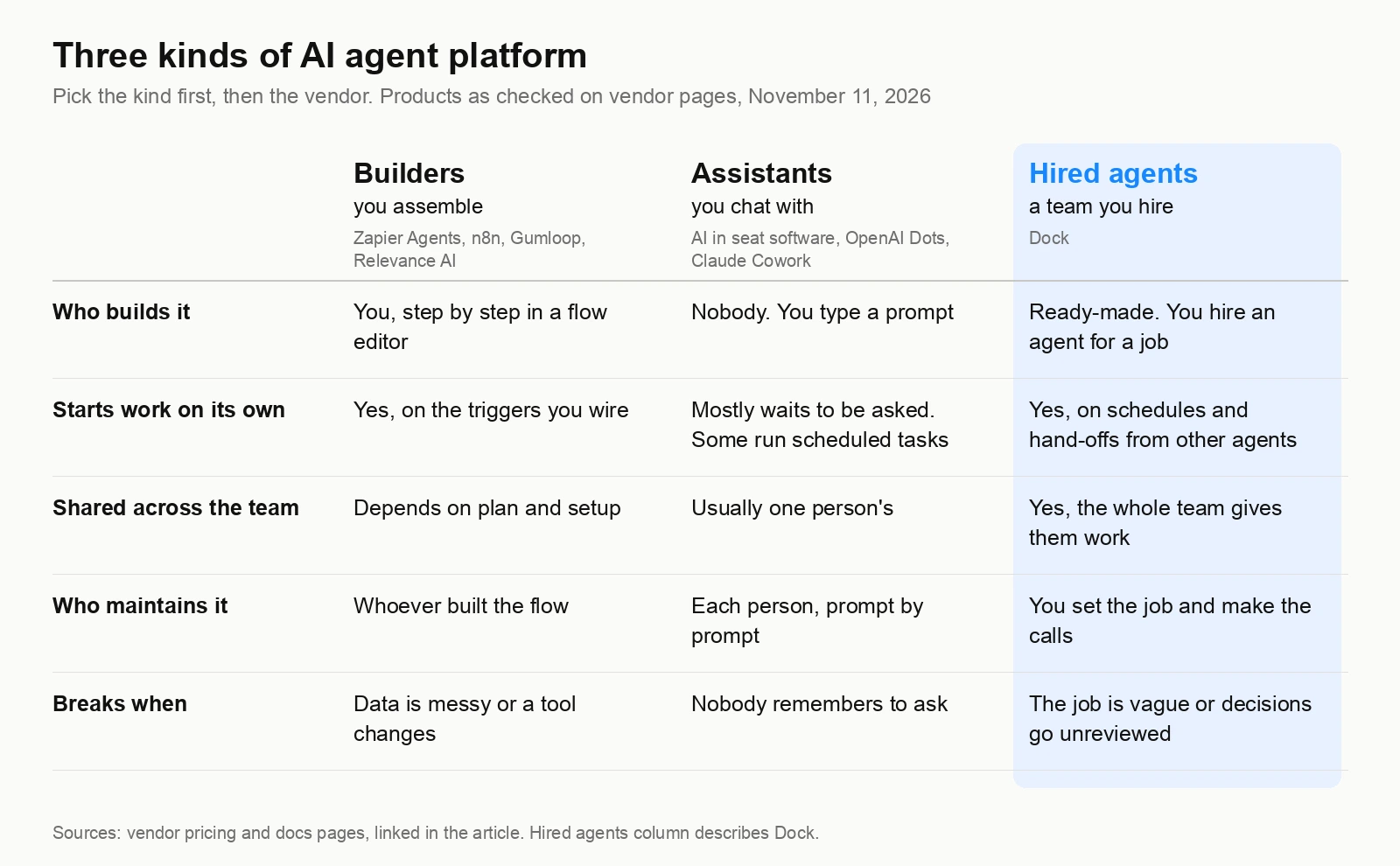
Each kind can be the right answer. The question is which one matches the work you need done.
Builders: you assemble the agent
Builders give you the most control. On n8n, a Schedule Trigger runs a workflow at set times, and an AI Agent Tool node lets one agent call others. Relevance AI lets you design Workforces, teams of agents that pass work between steps. Gumloop agents run on schedules, app events and webhooks, and on Pro, every team member can start tasks with team agents.
The cost is the building. Someone on your team has to design each flow, test it and own it. When the data comes in messy, a step fails. When an app changes a field or a vendor changes a product, the flow needs work.
That last risk is real. Since October 1, Zapier has been migrating Agents into AI by Zapier, inside the Zap editor and on task-based pricing. Zapier says it has not set a date to turn Agents off. Even so, every team running Zapier Agents now has a migration to plan.
Builders fit teams with an engineer or ops lead who enjoys building and has time to maintain. Our guides to n8n alternatives and Zapier alternatives go deeper on each.
Assistants: you ask, they answer
Assistants are the easiest kind to start with. You already have one in your email, your docs tool and your CRM. Type a request, get a draft.
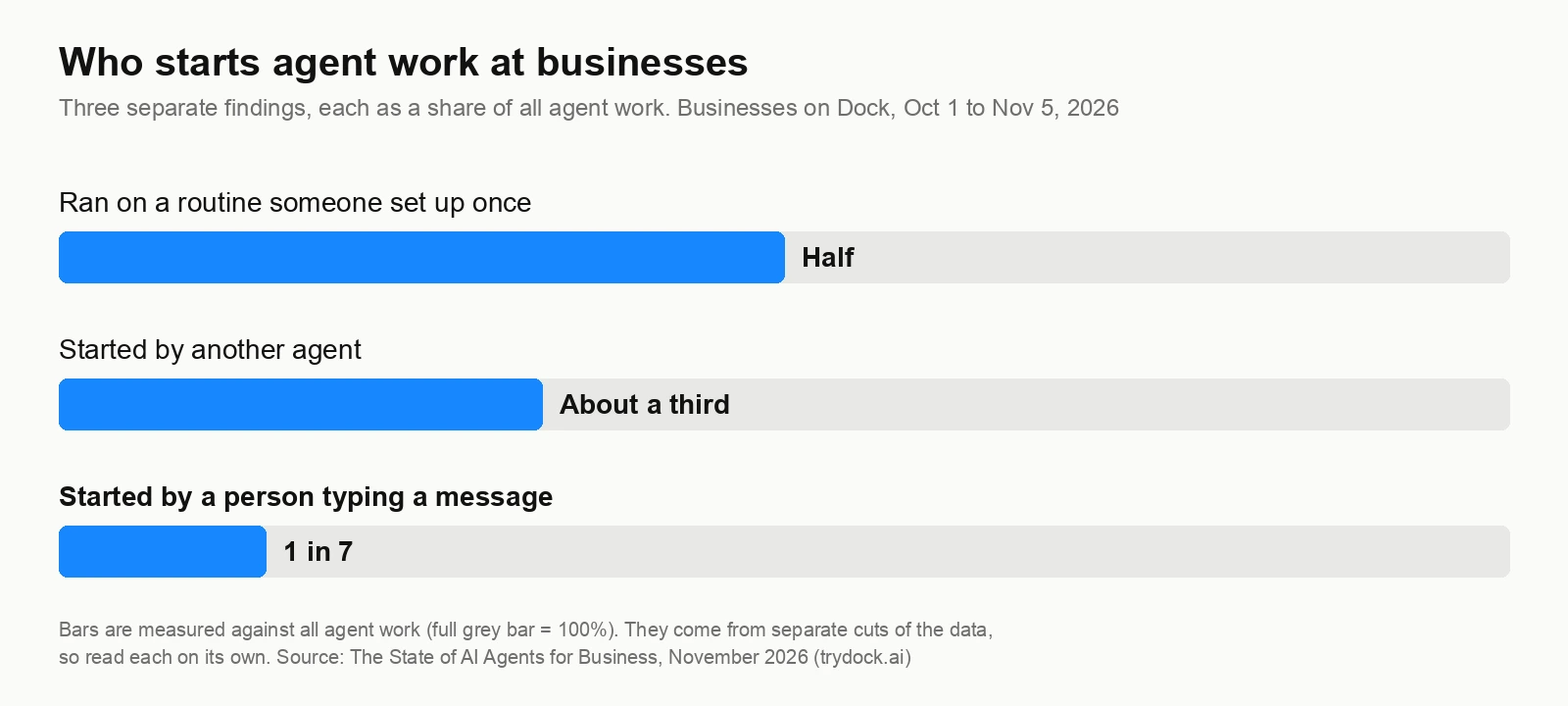
The limit is who starts the work. An assistant waits for someone to ask. In our data, only 1 in 7 pieces of agent work started with a person typing a message. The rest started on a routine or came from another agent. A tool that only works when asked covers a small slice of what agents do at businesses.
Personal agents go further. An OpenAI dot has its own cloud computer, can run recurring tasks and can research in the background. Claude Cowork runs scheduled tasks in the cloud with no device online.
But both work for one person. In a ChatGPT workspace, "Only a dot's owner can direct it," and other people's mentions don't start work. Cowork sessions can't be shared with others. That suits one busy person and leaves a team's work in one account.
Hired agents: a team that runs on its own
The third kind starts from the job. You hire a research agent, a sales agent or an ops agent. They come ready to work, run on a schedule and hand work to each other. People make the calls.
The report shows what that looks like in practice:
- Half of all agent work ran on routines someone set up once. About two in three routine runs happened outside weekday office hours: 21% on weekday evenings, 16% early in the morning, 13% overnight and 16% at weekends.
- A third of agent work was started by another agent. For every piece a person started by message, agents started about two and a half for each other.
- Shared agents carry the load. In teams, the quarter of agents shared with the whole team did half of all the work, and were handed 58% of the work other agents started.
- The work lands where people can see it. Agents made 97% of the edits in shared docs, tables and pages.
Take a six-person agency. A research agent builds a list of prospects at 6 a.m. and hands it to a sales agent. The sales agent drafts outreach and flags three accounts for the founder to approve. By the time the team opens their laptops, the work is waiting for a yes or no.
That's the shape of business agents: work that moves between agents and stops at people only for decisions. For more on how the hand-offs work, see our guide to agentic workflows.
How to pick the kind
Start with three plain questions.
- Do you have someone who wants to build and maintain flows? If yes, and you need exact control over every step, a builder fits.
- Is the work mostly one person asking for help with their own tasks? An assistant or personal agent fits.
- Do you want work done for the team, on a schedule, while people are busy or asleep? Hire agents.
Buy the first or second kind when you need the third, and you find out fast. The flow needs an owner, or the assistant sits idle until someone remembers it.
A 10-question buyer's checklist
Once you've picked the kind, use these to compare vendors. Each one comes from what agents did in our data.
- Who starts the work? Only 1 in 7 pieces of agent work started with a person typing. Ask how the agent gets work when nobody is typing.
- Does it run while you sleep? About two in three routine runs fell outside weekday office hours. Ask where the agent runs when every laptop is closed.
- Can agents hand work to each other? A third of agent work came from another agent. Ask whether a research agent can pass a brief to a sales agent without a person forwarding it.
- Can the whole team share one agent? Shared agents did half the work in teams. Ask whether colleagues can give the same agent work and see what the agent did.
- What happens on a busy day? On their busiest days, agents handled 20 or more pieces of work, and 42% arrived from another agent, against 34% on an average day. Ask how the platform handles a pile-up of hand-offs.
- Where does the work land? Agents made 98% of edits in shared tables, 98% in live pages and 85% in docs. Ask whether results land in places your team already reads.
- Does it cover the jobs you have? Sales, leads and email made up 32% of agent work, docs and research 28%, building 22%, admin and operations 10%, social and marketing 6% and SEO 1%. Of ready-made agent hires, half were for marketing and SEO and 43% for sales. Ask whether there's an agent ready for your first job, or whether you build it.
- How does it handle your inbox? Of teams that connect apps, 48% hand an agent their Gmail inbox. Ask what the agent can send unprompted and what comes back to you for approval.
- Does it come with business data? 56% of agents' calls to built-in business data were for finding people and companies. Ask whether lead and company data is included or another subscription.
- What does one working agent cost, all in? Compare the cost of an agent doing a job, including model usage, data and the hours someone spends maintaining it. Seat prices leave that out.
n8n charges per workflow execution. Gumloop uses credits plus an 8% orchestration fee. Relevance AI counts Actions, and a failed tool run still counts as one. None of these include the time spent fixing flows.
Our pick: Dock
Dock is where businesses hire agents for business work. We build it, so weigh our view accordingly.
Each agent has their own computer, memory and schedule, so routines run overnight and at weekends. Agents are shared with the whole team and hand work to each other, and they bring people the decisions.
On Starter, Dock costs $40 a person a month, with model usage, five cloud agents, 10,000 business credits and 2,000+ platforms included. That works out to $8 a working agent, before you count the hours they save.
Two customers show what that looks like. Jared Ben-Jamin, Mach9's first sales hire, runs seven agents that keep 82 deals current every hour. Brandon K.'s agents found 70 verified leads with work emails for his team.
For the full field, see our ranking of the best AI agents for business.
Where Dock is not the right pick
Dock won't fit everyone. Pick something else if:
- You want to self-host or control every step. n8n offers a free, self-hosted Community Edition, and a technical team can shape every node.
- You already run your business on Zapier. If your automations live in Zaps, adding AI steps there may be simpler. Check the migration to AI by Zapier first.
- You have engineers who want to design multi-agent systems. Relevance AI's Workforces and Gumloop's subagents give builders that canvas.
- You need help for one person only. A personal agent such as an OpenAI dot or Claude Cowork may be enough. Our guide to Lindy alternatives covers more tools in this space.
- Your agent work is mostly one-off questions. The AI already inside your seat software may cover it.
FAQ
What is an AI agent platform? An AI agent platform is software for running AI agents that take actions in your apps, beyond answering questions. Platforms come in three kinds: builders you assemble, assistants you chat with and teams of agents you hire.
What's the difference between an AI agent builder and hired agents? With a builder, you design each flow and maintain it when data or tools change. Hired agents come ready for a job, run on a schedule and hand work to each other, and you set the job and make the decisions.
Do I need to code to use an AI agent platform? Builders range from no-code editors to tools that reward technical skill, and someone still has to own each flow. Assistants and hired agents need no code. You describe the job in plain words.
How much does an AI agent platform cost? Compare the cost of one working agent, all in: model usage, business data and maintenance time. On Dock's Starter plan, $40 a person a month covers five cloud agents with model usage included, about $8 an agent.
Can AI agents work while my team is offline? Yes, if the platform runs agents on their own computers and schedules. In our data, about two in three routine runs happened outside weekday office hours, including 16% at weekends.
Is a personal agent enough for a team? Usually not. Personal agents such as OpenAI Dots take direction from their owner only, and Claude Cowork sessions can't be shared. Teams get more from agents everyone can give work to, since shared agents did half the work in teams on Dock.
Hire agents for business work. Start free trial.