The 10 best Viktor alternatives are Dock, Lindy, Claude, OpenAI Dots, Grok Bot, Dust, Sintra, Relevance AI, Zapier Agents and n8n, and they fit different needs. Lindy and Claude are the closest swaps if you want one shared helper in Slack, OpenAI Dots and Grok Bot suit people who want an agent of their own, Dust suits a team with someone ready to build agents for everyone, Sintra covers marketing content on a small budget, and Relevance AI, Zapier Agents and n8n suit teams that want to wire agents themselves. When a company wants a team of specialist agents to run the work, rather than one helper that everyone asks, we think Dock is the better fit, because each agent has a role, a reporting line and permissions, and they hand work to each other. We build Dock, so weigh our view accordingly.
Coding already made this shift. Developers now direct coding agents that write, test and ship the code. Business work is next: finding buyers, following up, publishing, chasing invoices. Viktor and Dock both talk about hiring rather than buying software. They differ on what you hire, and this post sorts the 10 Viktor alternatives by that line.
Why founders look for a Viktor alternative
Viktor is a serious product. Its homepage says it is "Used by 74,000+ teams," shows a 4.9 rating on G2, and puts its pitch in four words: "Not a tool. A hire." It lives in Slack and Microsoft Teams, runs on "his own computer in the cloud," and asks before anything it can't undo. The reasons people look elsewhere come from Viktor's own pages.
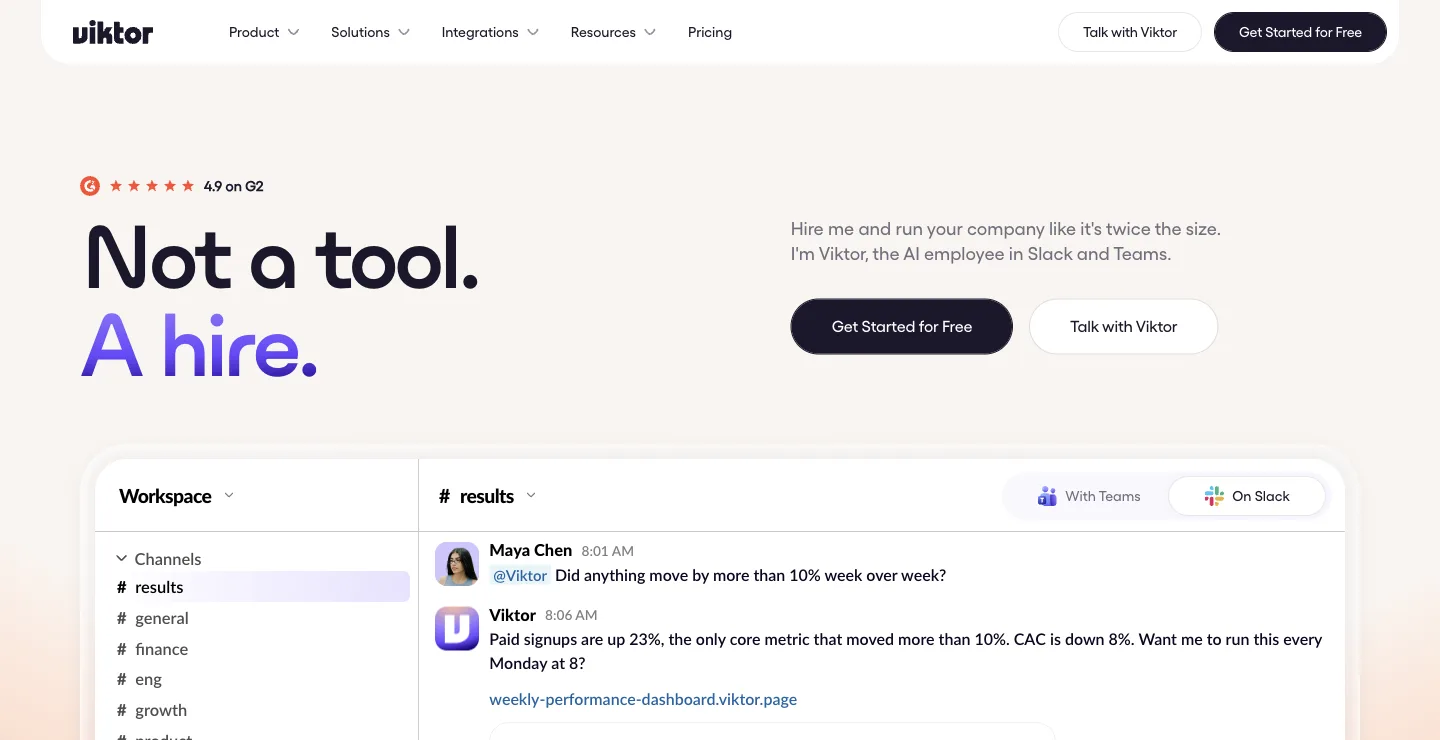
Viktor's homepage on October 18, 2026.
One employee for everyone. The Viktor homepage FAQ calls it "one shared AI employee for your team" and says "All team members on a plan share the same Viktor instance and context." Anyone can mention @Viktor in a channel it has been invited to. That makes it easy to start. It also means one generalist holds every job, and the sales work and the finance work run through the same instance.
One context for the whole workspace. The same FAQ says "Viktor currently operates at the workspace level." Admins choose which tools need approval and who can connect integrations, and in Slack some integrations can be kept private. Viktor has context from public channels and direct messages, and a Private Mode with per-user isolation is "on our near-term roadmap." Viktor's own advice is to treat it "like a shared team resource" and avoid sharing sensitive personal information in direct messages.
The bill counts work. The Viktor pricing page, as of October 22, 2026, lists a free start with "up to $100 in credits," no card needed, and a Team plan at $100 a month for 40,000 credits "shared across your whole workspace." There is no seat charge. Viktor's FAQ says 40,000 credits is "Roughly 80-400 tasks depending on complexity": a quick Slack question might use 50 to 100 credits and a deep research report 500 to 2,000. "Scheduled automations run on credits too. Frequency matters." Unused monthly credits roll over for one month.
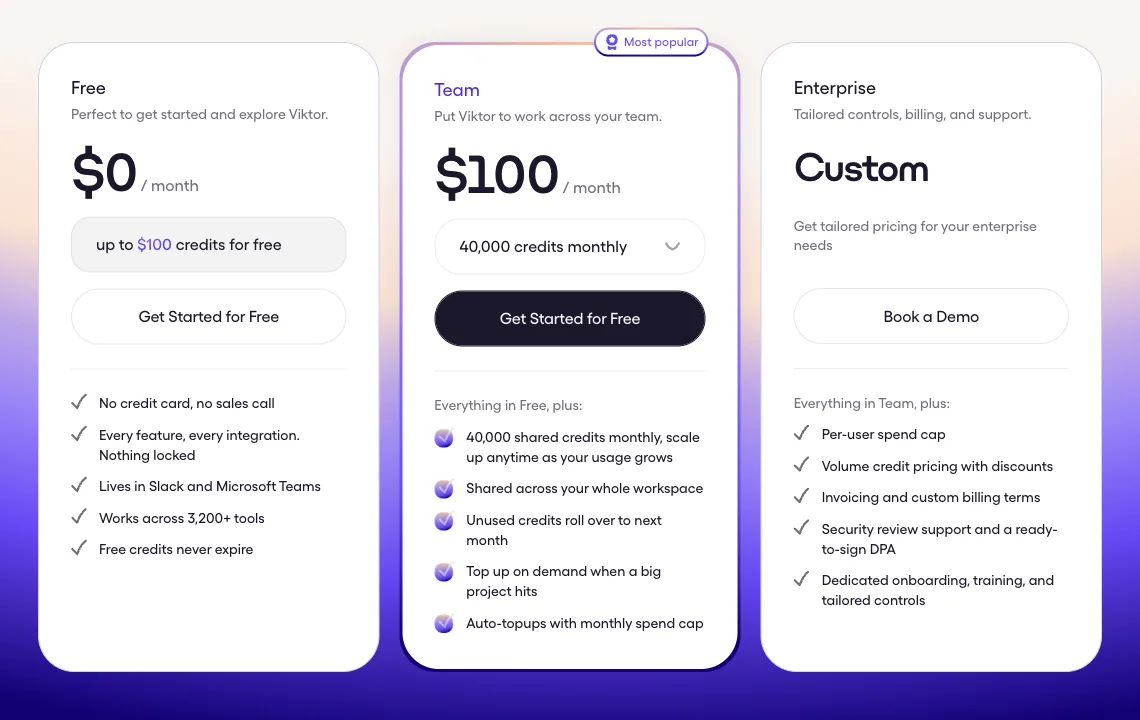
Viktor's pricing page on October 14, 2026.
None of that is a flaw. It is the shape of one shared helper. Our guide to AI agents for business covers the other shape.
One shared helper, or a team of specialists
There are two kinds of product on this list.
The first kind adds one helper to the people you have. Viktor, Lindy and Claude's @Claude in Slack all work this way, and OpenAI Dots and Grok Bot do it for one person at a time. Someone asks, the helper does the task, and the person who asked decides what happens next. Builders like Dust, Relevance AI, Zapier Agents and n8n are a variation: they let you assemble several agents, which means someone on your team now designs and maintains them.
The second kind gives the company a team. Specialist agents each own a recurring job in sales, marketing or operations, hand work to each other, and bring a person only the decisions. A Chief of Staff keeps them coordinated, so you manage one conversation instead of ten. That is what Dock is built for, and it is the bet behind small teams, big companies: a small team that runs a company which used to need many more people.
A quick test tells you which you need. If most of your requests start with "can you quickly," a shared helper is probably enough. If you keep wishing someone owned the pipeline, the content calendar or the overdue invoices every week, without being asked, you are describing a team.
How we picked
We read the pages that rank for "Viktor alternatives" and "Viktor AI alternatives" this week, plus the comparison pages Viktor publishes itself, and kept the tools a founder would realistically shortlist. Lindy and Zapier Agents appear on almost every list. Claude, Dust, n8n and Sintra come up often, and Viktor's own comparison pages include Claude Tag, Grok Bot and ChatGPT.
We checked Viktor's homepage and pricing page on October 22, 2026, and rechecked every other price on the vendor's own page or help center the same day. Anything we could not confirm there, we left out. The screenshots are from earlier captures and carry their own dates. Vendors change prices often, so check the linked page before you buy.
Where Dock is the better fit
Viktor is a capable helper. These are the reasons we think a team of specialist agents suits a company that wants recurring work run, not just done on request.
Each agent owns one job. Each Dock agent has a name, a role, a reporting line and permissions. A lead research agent can find buyers, hand them to an outbound agent, and an operations agent can chase the invoices, each with only the access their job needs. Viktor is one instance with one shared context for the whole workspace, so the same helper holds every job.
Agents hand work to each other. In Dock, work moves between agents without you passing it along, and a Chief of Staff keeps the roster coordinated. You can reach your Chief of Staff by email or iMessage. With Viktor, the work moves through people asking in Slack or Teams threads.
Permissions fit the role. You set permissions per agent, so an agent can be made to ask before anything sensitive. Shawn Dej, CEO of YourStory AI, runs an eight-agent sales org in Dock that works 400+ schools and 150+ community colleges. Every send waits for his OK, which he gives by text. Viktor also asks before high-stakes actions, and admins can set approval rules per tool, but it is still one instance holding one shared context.
The memory belongs to the company. What Dock agents learn goes into the Company Brain, so it stays with the business when people move on or you change models. Viktor also builds a workspace knowledge base, recorded as "skills," so the difference here is that a team of specialists shares it rather than one helper.
You choose where agents run and which model they use. Each Dock agent runs on your Mac or in the cloud, where they work 24/7, on models from Anthropic, OpenAI or other labs. You hire ready-made specialists from the Agent Marketplace.
Pricing counts people, with agents included. Dock is per person: $20, $100 or $200 a month with 5, 10 or 20 always-on agents, as of October 2026. Viktor bills the workspace by credits, with no seats.
Where Dock is not the right pick
- Your team wants one helper living entirely in Slack or Teams. Viktor may be simpler. You install it, connect your tools, and anyone can mention it in a channel. Dock's work lands in shared workspaces, and you reach the Chief of Staff by email or iMessage.
- Many people need light help, occasionally. Viktor bills the workspace, not seats, so a large team with a light load may pay less there than for Dock seats.
- You need the widest tool coverage. Viktor says it connects to 9,800+ tools and can build a custom integration when one is missing. Dock has 2,000+ platforms built in plus the apps you connect.
- You need compliance paperwork today. Dock is a young company, and its SOC 2 Type II report is not yet attested. Viktor's FAQ says it is SOC 2 Type 1 compliant with Type 2 in progress, Dust lists SOC 2 Type II, and Lindy's Enterprise plan offers a signed BAA.
- You want one agent for your own work. A personal agent like OpenAI Dots or Grok Bot may already come with a plan you pay for.
Won't the big AI labs just build this?
They already have pieces of it. Anthropic's Claude Tag puts one shared @Claude in a Slack channel, and OpenAI's dots can join Slack and Microsoft Teams. Both are on this list, and the labs may well add more team features. Today, what each lab ships runs on its own models, and the team versions are one general agent per channel or one agent per person. Our bet is that a company will want a team of specialist agents with roles and a reporting line, a memory the business owns, and the freedom to use whichever lab's model is best for each job. That is the layer Dock builds: the team, the memory and the permissions live in Dock, and the models underneath can change as the labs improve. Better models from the labs help Dock agents too. This is our reasoning, not a certainty.
Is the category crowded? Yes. Most products in it are shared helpers for the people you have, like Viktor, Lindy and Claude Tag, or builders you configure, like Dust, Relevance AI, Zapier Agents and n8n. Dock aims at a narrower job: a team that runs specific work end to end, like lead generation, follow-ups and collections.
Viktor alternatives compared
| Tool | What it is | Price (as of Oct 22, 2026) | Who does the work | Billed by |
|---|---|---|---|---|
| Dock | A team of business agents the company owns | $20, $100 or $200 per person a month, with 5, 10 or 20 always-on agents | Specialist agents with roles; people make the calls | Person, with agents included |
| Viktor | One shared AI employee in Slack and Teams | Free start up to $100 in credits; Team $100 a month for 40,000 credits | One helper, on request or on a schedule | Workspace credits |
| Lindy | One shared helper in Slack, iMessage and email | Team from $29.99 per active user a month for 3,000 credits | One helper, on request or on a schedule | Every active user, then credits |
| Claude (Cowork is now part of Claude) | Cowork for each person, plus @Claude in Slack | Team $25 per seat a month ($20 billed annually) | One Claude per channel, or the person who asked | Seat, then usage limits |
| OpenAI Dots | One always-on agent per person | Included with ChatGPT Pro ($100 to $500) or a Business Premium seat ($125) | The person who owns the dot | Seat |
| Grok Bot | Named bots on one person's cloud computer | Included with Premium $30, Super $100, Ultra $200, or Teams $30 per user a month | The account owner's bots | Subscription |
| Dust | A platform for building team agents | Pro €24 per seat a month billed yearly (€30 monthly) | Agents your team builds | Seat, then credits |
| Sintra | 12 ready-made marketing helpers | From $15.60 a month on a 12-month plan | Your people, with help | Plan, then credits |
| Relevance AI | An agent builder | Pro $19 a month billed annually ($29 monthly) | Agents your team builds | Build users, then Actions |
| Zapier Agents | Agents on top of Zapier | Agents Free (400 activities); Agents Pro $33.33 a month billed annually | Agents your team builds | Activities |
| n8n | Workflow automation with agent nodes | Starter €20 a month billed annually; self-host free | Workflows your team builds | Workflow executions |
The new model: a team that runs the work
1. Dock
Dock is where businesses hire AI agents for business work: sales, lead generation, marketing and operations. Each agent has a name, a role, a reporting line and permissions, and they hand work to each other. Every account starts with a Chief of Staff who runs the team, so you manage one conversation instead of ten, and you can reach them by email or iMessage. You hire ready-made specialists from the Agent Marketplace for the jobs your business needs, such as finding leads, running outbound, publishing content or chasing overdue invoices. Dock is backed by Y Combinator (S26).
What the agents learn goes into the Company Brain, so it stays with the company. Each agent runs on your Mac or in the cloud, where cloud agents work 24/7, on the model that suits their job. Agents reach 2,000+ platforms built in, plus the apps you connect, and per-agent permissions keep sensitive actions waiting for a person.
Price: per person per month, per the Dock pricing page, as of October 2026. Starter is $20 with 5 always-on agents, Standard is $100 with 10, and Scale is $200 with 20.
Does well: specialists that own recurring jobs and work on a schedule rather than waiting to be asked, with a Chief of Staff keeping them coordinated and a memory the company keeps.
The catch: Dock is a young company. Its SOC 2 Type II is not yet attested, it does not live inside Slack the way Viktor does, and Viktor reaches more tools by its own count.
Best for: startups and agencies that want recurring sales, marketing and operations work run by a team of agents, with people approving what goes out.
Shared helpers in Slack
2. Lindy
Lindy is the closest like-for-like swap for Viktor. The Lindy pricing page describes a "Slack-native teammate in threads + mentions" that also works over iMessage and email, with scheduled routines, 1,500+ integrations and "Approvals built in."
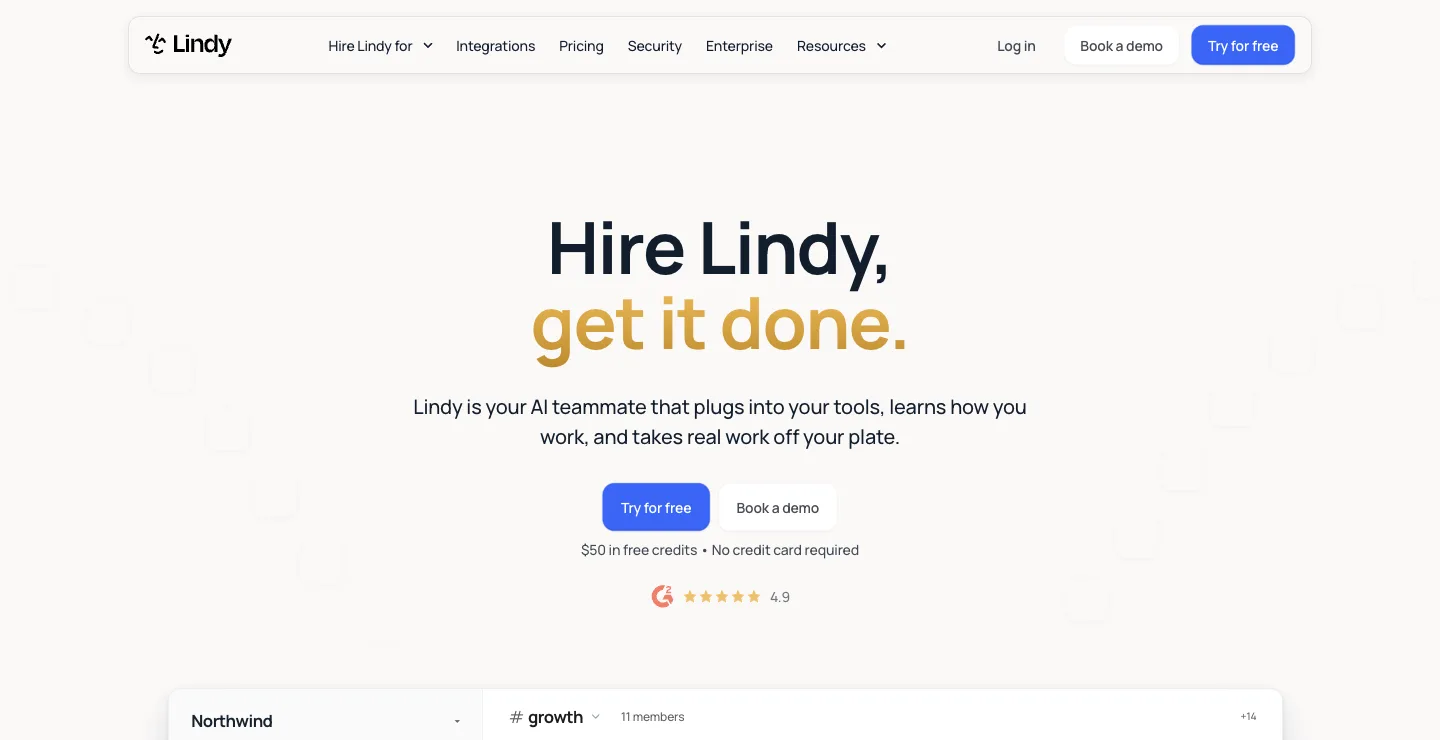
Lindy's homepage on October 18, 2026.
Price: as of October 22, 2026, Lindy starts you with $50 in free credits that last 7 days. Team starts at $29.99 a month for 3,000 credits, pooled across the team, and "Every active user in your workspace is billed." Monthly credits don't roll over, top-ups cost $10 per 1,000 credits, and Enterprise adds SSO, SCIM, audit logs and a signed BAA.
Does well: inbox, meeting and follow-up work, with approvals built in and a compliance path for regulated teams.
The catch: where Viktor bills the workspace, Lindy bills every active user and then meters credits, and when the pool runs out Lindy pauses credit-using actions until the next cycle. More in our Lindy alternatives guide.
Best for: small teams whose main pain is inbox and meeting follow-up, who want one helper in Slack and iMessage.
3. Claude (Cowork and Claude Tag)
Anthropic's Claude now covers both halves of what Viktor does. Claude Tag lets Claude join Slack as a team member: "Within a given Slack channel, there's one Claude that interacts with everyone." With "ambient" behavior on, it flags what you might need to know and follows up on threads that have gone quiet. Cowork, now part of Claude and included on the Team plan, handles file, research and document work for each person. More in our Claude Cowork alternatives guide.
Price: on claude.com/pricing, as of October 22, 2026, Team is for 2 to 150 people at $25 per Standard seat a month ($20 billed annually) and $125 per Premium seat ($100 billed annually). @Claude is listed on the Team and Enterprise plans. Pro is $20 a month and Max starts at $100.
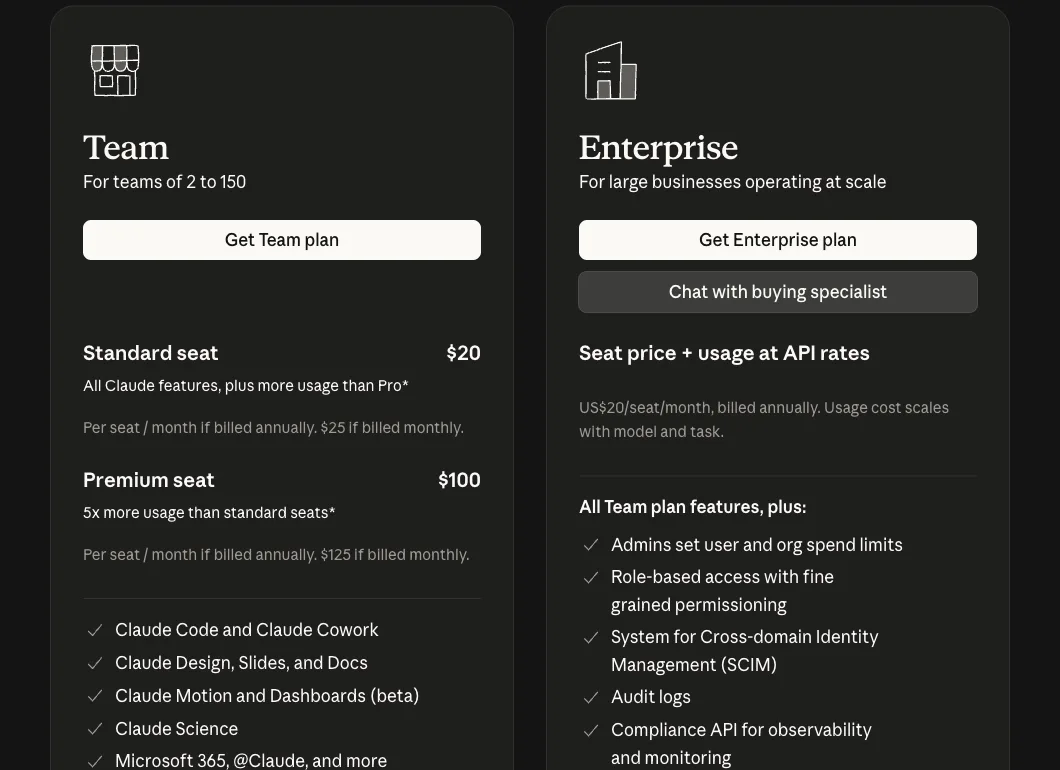
Claude's pricing page on October 14, 2026.
Does well: one shared Claude per channel that anyone can pick up from where the last person left off, from the lab that makes the model.
The catch: Claude Tag is in beta and starts on Slack only. You get one general agent per channel, so roles like the SDR or the bookkeeper are yours to define in prompts, and the Team plan bills per seat.
Best for: teams already on Claude who want a shared @Claude in Slack and Cowork for each person's own work.
Personal agents that join your chat
4. OpenAI Dots
OpenAI launched dots on September 29. Per OpenAI's getting started article, a dot is "an always-on agent in ChatGPT," powered by GPT-6 Astra, with its own cloud computer, and you can connect it to Slack.
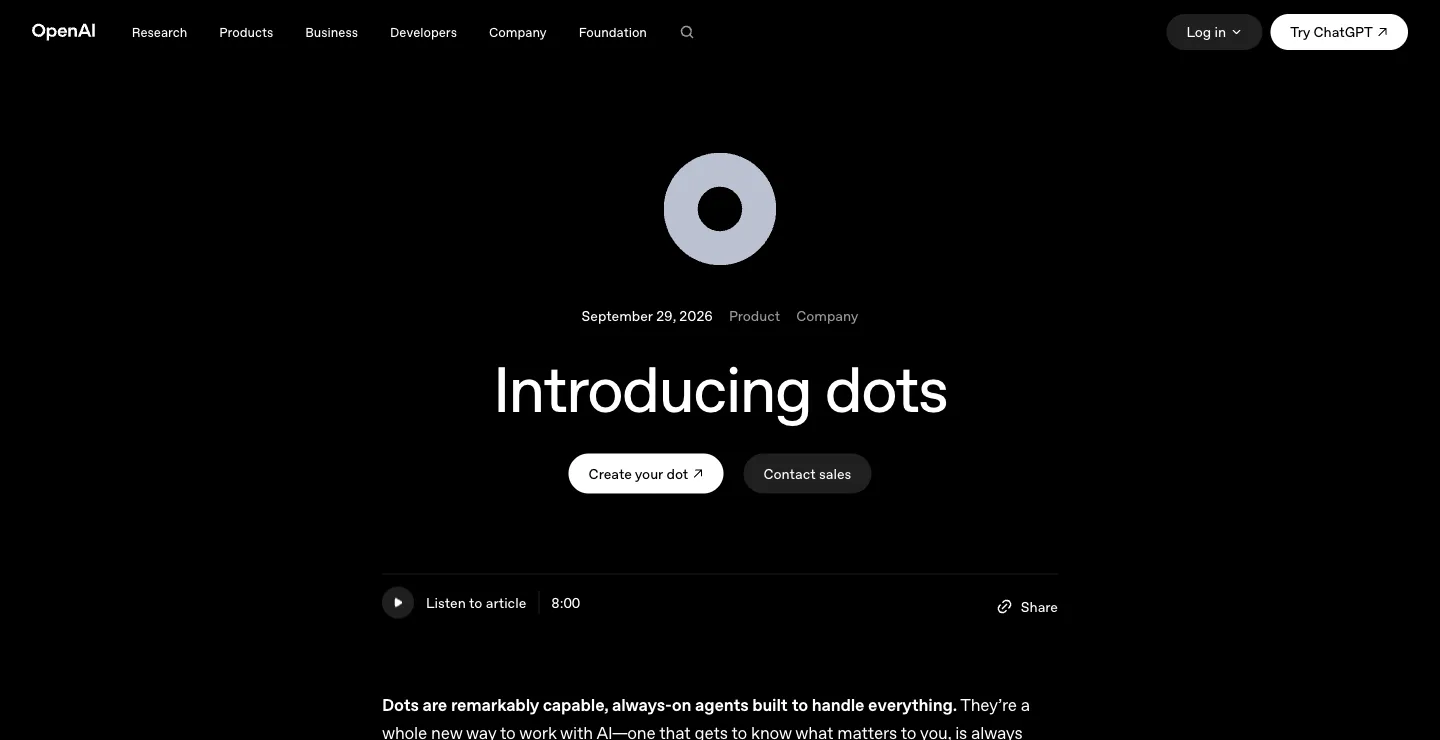
OpenAI's dots announcement on October 18, 2026.
Price: your first dot is included with ChatGPT Pro at $100, $200 or $500 a month, per the Pro tiers page, or with a Business Premium seat at $125 a user a month, or $100 billed annually, with a two-seat minimum, per the Business FAQ, as of October 22, 2026. Pro dots are not offered in the European Economic Area, Switzerland or the UK.
Does well: a capable always-on agent inside a product many teams already pay for.
The catch: it is the opposite of Viktor's shared model. OpenAI's workspace admin guide says "Only a dot's owner can direct it," so in Slack or Microsoft Teams a colleague can see your dot's posts in a channel but cannot hand it a task. OpenAI says "In the future, you'll be able to add more dots." More in our OpenAI Dots alternatives guide.
Best for: people on ChatGPT Pro or Business Premium who want an always-on agent of their own.
5. Grok Bot
Grok Bot gives each named Bot a persistent cloud computer, lets you teach a routine by doing it once, and runs routines on a schedule. Bots in the same thread pass work between themselves, and Team Bots each get their own Slack handle.
Price: as of October 22, 2026, Grok Bot is included with Premium at $30 a month, Super at $100 and Ultra at $200, or with Teams at $30 per user a month, plus custom Enterprise plans. Super includes 3.5x Premium usage and Ultra 12x.
Does well: the most work-shaped of the big-lab agents, with routines, triggers and bots that hand work to each other.
The catch: Grok Bot's own FAQ says every Bot shares one persistent cloud computer, files, browser and logins included, and "Isolation is per user, not per Grok Bot." Team Bots keep "separate context and memories for each user," so what one colleague teaches a Bot does not carry over to the next. For the full comparison, see Dock vs Grok Bot.
Best for: a power user who wants several bots of their own that learn routines and keep working with the laptop closed.
Agent builders and ready-made helpers
6. Dust
Dust calls itself "Multiplayer AI for human-agent collaboration." Per the Dust homepage, teams "create, share, and run agents" on 20+ models from OpenAI, Anthropic, Google, Mistral and more, with 70+ connectors including Slack, Notion, Salesforce and Zendesk. In Slack, you call a specific agent with @Dust and its name, per Dust's Slack docs, and an admin can set a default agent for a channel.
Price: the Dust pricing page, as of October 22, 2026, lists seat types on its Business plan for teams up to 100 people: Free with 500 lifetime credits, Pro at €24 per seat a month billed yearly (€30 monthly) with 8,000 credits, and Max at €120 billed yearly (€150 monthly) with 40,000 credits, excluding VAT. Credits reset each billing period and do not roll over. Enterprise is custom.
Does well: several named agents in Slack instead of one, a model choice per agent, and SOC 2 Type II.
The catch: Dust is a platform for building agents. Its own homepage is aimed at "AI Operators" who "build it with judgment, deploy it, and run it for their whole team," so someone on your team designs and maintains each agent.
Best for: teams with a technical operator who wants to build several agents on company knowledge and offer them in Slack.
7. Sintra
Sintra sells 12 ready-made "AI Employees," including Buddy for business development, Emmie for email marketing, Seomi for SEO and Soshie for social media, per the Sintra homepage.
Price: the Sintra pricing page, as of October 22, 2026, shows a 12-month plan at $15.60 a month, a 3-month plan at $23.60 and a 1-month plan at $48.50, each with all 12 helpers, 250 monthly credits and "15+ integrations."
Does well: the cheapest way on this list to get ready-made marketing helpers.
The catch: 250 credits and 15+ integrations cover content help. It is lighter on operational work like outbound or collections, and it does not live in your Slack the way Viktor does.
Best for: marketing content help on a small budget.
8. Relevance AI
Relevance AI is an agent builder: its homepage says agents are "Built and customized by your team."
Price: the pricing docs, as of October 22, 2026, list Pro at $19 a month billed annually ($29 monthly) with 2 build users, and Team at $234 a month billed annually ($349 monthly) with 5 build users and 45 end users. The Free plan is retired. Extra Actions cost $80 per 1,000.
Does well: a no-code canvas for teams that want to design custom agents.
The catch: someone on your team becomes the person who builds and maintains the agents, and every tool run is metered. More in our Relevance AI alternatives guide.
Best for: teams that want to design custom agents on a no-code canvas.
9. Zapier Agents
Zapier Agents sit on top of Zapier's automation platform and do "work across 9,000+ apps," per the Agents page.
Price: per the Zapier pricing page, as of October 22, 2026, Agents Free includes 400 activities a month and Agents Pro is $33.33 a month billed annually ($400 a year) for 1,500 activities. Zapier's Professional automation plan starts at $19.99 a month billed annually.
Does well: broad app coverage, and agents can use the connections your Zaps already have.
The catch: you design each agent, and a paid run stops at 40 activities to ask before continuing.
Best for: teams already running on Zapier who want agents across its app catalog.
10. n8n
n8n is a workflow automation tool with AI agent nodes that you can self-host.
Price: the n8n pricing page, as of October 22, 2026, lists Starter at €20 a month, Pro at €50 and Business at €667, billed annually, and says "All plans include unlimited users & workflows and every integration." A self-hosted Community Edition is free.
Does well: a full workflow run counts as one execution however many steps it has, so cost is easier to predict.
The catch: agents are workflows you assemble node by node, and self-hosting means your team owns updates and uptime.
Best for: teams with an engineer who wants full control, or who need to self-host.
Viktor vs Dock
Both say "hire." The difference is whether you hire one helper for everyone or a team of specialists for the company.
With Viktor, your team shares one AI employee in Slack or Teams that anyone can ask, and the workspace pays for credits as the work gets done. With Dock, the company hires a team: a Chief of Staff coordinates specialists who each own a job, hand work to each other and bring you only the decisions. The case for that model is in hire agents, not headcount.
| Viktor | Dock | |
|---|---|---|
| Shape | One shared AI employee | A team of specialist agents with roles and reporting lines |
| Where you reach it | Slack, Microsoft Teams, a web app and Discord | Shared workspaces; the Chief of Staff by email and iMessage |
| How work moves | People ask in threads; Viktor can repeat tasks on a schedule | Agents hand work to each other; a Chief of Staff coordinates |
| Access | One shared instance; admins set approval rules per tool | Permissions per agent, fitted to each role |
| Where it runs | Viktor's cloud computer | Your Mac or the cloud; cloud agents 24/7 |
| Price (Oct 2026) | Free start up to $100 in credits; Team $100 a month for 40,000 credits | $20, $100 or $200 per person a month with 5, 10 or 20 always-on agents |
| Security paperwork | SOC 2 Type 1; Type 2 in progress | SOC 2 Type II not yet attested |
If what you need is one helper in Slack that anyone can ask, Viktor does that well. If you want specialist agents to own recurring work for the company, Dock is built for that.
How to choose
| If you want | Choose |
|---|---|
| A team of specialist agents that runs sales, marketing and ops for the company | Dock |
| One helper in Slack that bills per active user, with a BAA on Enterprise | Lindy |
| A shared @Claude in Slack plus Cowork for each person | Claude |
| An always-on agent for each person on ChatGPT | OpenAI Dots |
| Several bots of your own that learn routines | Grok Bot |
| To build several named agents for your team in Slack | Dust |
| Cheap ready-made marketing helpers | Sintra |
| To build custom agents or workflows yourself | Relevance AI, Zapier Agents or n8n |
More comparisons: Lindy alternatives, Sintra alternatives, Relevance AI alternatives, monday.com AI agents alternatives, Zapier alternatives.
FAQ
What is the best Viktor alternative?
It depends on what you want. If you want another shared helper in Slack, Lindy and Claude's @Claude are the closest matches. If you want a team of specialist agents running work for the company, we think Dock is the better fit: you hire agents for sales, marketing and operations, they hand work to each other, a Chief of Staff coordinates them, and plans start at $20 per person a month with 5 agents always on. We build Dock, so weigh our view accordingly.
How much does Viktor cost?
As of October 22, 2026, Viktor's pricing page lists a free start with up to $100 in credits and no credit card, and a Team plan at $100 a month for 40,000 credits shared across the whole workspace, with larger credit amounts available. There is no per-seat charge. Viktor says 40,000 credits is roughly 80 to 400 tasks, unused monthly credits roll over for one month, and Enterprise pricing is custom.
Is Viktor free?
Viktor has a free start with up to $100 in credits, no credit card required, and Viktor says free trial credits never expire. When they run out, you pick a paid plan.
What is the difference between Viktor and Dock?
Viktor is one shared AI employee that lives in Slack and Microsoft Teams, works for everyone who mentions it, and bills the workspace by credits. Dock is a team of business agents the company owns: a Chief of Staff and specialists who each have a role, a reporting line and permissions, hand work to each other and bring you only the decisions. Dock plans are per person and include 5, 10 or 20 always-on agents.
Does Viktor have more than one agent?
Viktor's own FAQ describes it as one shared AI employee, and says all team members on a plan share the same Viktor instance and context. If you want several named agents, Dust lets you build them, Grok Bot gives one person several bots, and Dock gives the company a team of specialists with roles.
Won't OpenAI or Anthropic just build this?
They already have pieces of it: Anthropic's Claude Tag puts a shared @Claude in Slack, and OpenAI's dots can join Slack and Microsoft Teams. Today, what each lab ships runs on its own models, and the team versions are one general agent per channel or one agent per person. Dock is betting that a company will want a team of specialist agents with roles and a reporting line, a memory the business owns, and the freedom to use whichever lab's model is best for each job. That is our reasoning, not a certainty.
In short: Viktor, Lindy or Claude for one shared helper in Slack, a personal agent for your own work, a builder if you want to wire agents yourself, and Dock if your company wants a team of specialist agents running the work. If that last one is you, see how Dock works or start free.