The 10 best Claude Cowork alternatives for a team are Dock, ChatGPT Work, Microsoft Copilot Cowork, Notion Custom Agents, Perplexity Computer, Manus, Grok Bot, OpenAI Dots, Lindy and OpenClaw, and they fit different needs. ChatGPT Work and Microsoft Copilot Cowork are the closest swaps if you want the same kind of hand-it-a-task agent from another vendor, Notion Custom Agents suit a team that already runs on Notion, Perplexity Computer and Manus suit research and one-off deliverables, Grok Bot and OpenAI Dots give one person an always-on agent, Lindy is a shared helper in Slack, and OpenClaw is for teams that want to self-host. When a company wants agents to run standing jobs for the business, not just take tasks from one person, we think Dock is the better fit, because you hire a team of named agents with roles, schedules and a memory the company keeps. We build Dock, so weigh our view accordingly.
Claude Cowork is a very good product, and it sits right next door to what we build. Dock agents can run on Claude models too, so this is not a guide about leaving Claude. It is about who the agent works for. Cowork is an excellent AI coworker that one person drives: you hand it a goal, it works, you review. A team of agents is a different shape: each agent has a standing job, a schedule and a reporting line, and the work belongs to the company.
Every claim below about another vendor links to the vendor's own page or launch coverage, as of October 22, 2026.
What Claude Cowork is today
Anthropic describes Claude Cowork as the place you hand Claude a multi-step task: you give it a goal, it works across "folders and tools you choose," and you review what it made. Its getting started guide says Cowork "brings Claude Code's agentic capabilities to knowledge work beyond coding": research, analysis and documents, rather than software.
It is no longer a separate mode. On September 16, Anthropic announced that "Claude Cowork and chat are merging into one Claude," rolling out on Pro and Max first, with "Team and Free plans" to "follow soon." The pricing page now opens with a banner: "Claude Cowork is now just Claude."
Where it runs. Per Anthropic's help article, since October 6 new Cowork tasks on Pro and Max run in the cloud: "Close your laptop and Claude keeps going," and "Scheduled tasks run with no device online." The desktop app on macOS or Windows is still "the full Cowork experience," because local files, browser use and computer use go through it. On Team plans, Cowork on web and mobile is in beta.
Approvals. You pick one of three modes: Manual, where Claude pauses for your approval on actions; Auto, where Claude reviews each action for safety; or Skip, which Anthropic says to use only "when you completely trust every action." Claude asks for explicit permission before permanently deleting any files.
Team controls. On Team and Enterprise, the Cowork page says admins can set access by team, manage spend limits, control tool permissions by department, stream activity to a SIEM through OpenTelemetry, and turn Cowork off for the organization.
Price. On claude.com/pricing, as of October 22, 2026: Pro is $20 a month, or $17 a month billed annually. Max starts at $100 a month for 5x or 20x Pro's usage. Team, for 2 to 150 people, is $25 per Standard seat a month or $20 billed annually, and $125 per Premium seat or $100 billed annually. Enterprise is $20 per seat a month billed annually, plus usage at API rates, with a 20-seat minimum. The Cowork page notes it uses your limits faster than chat.
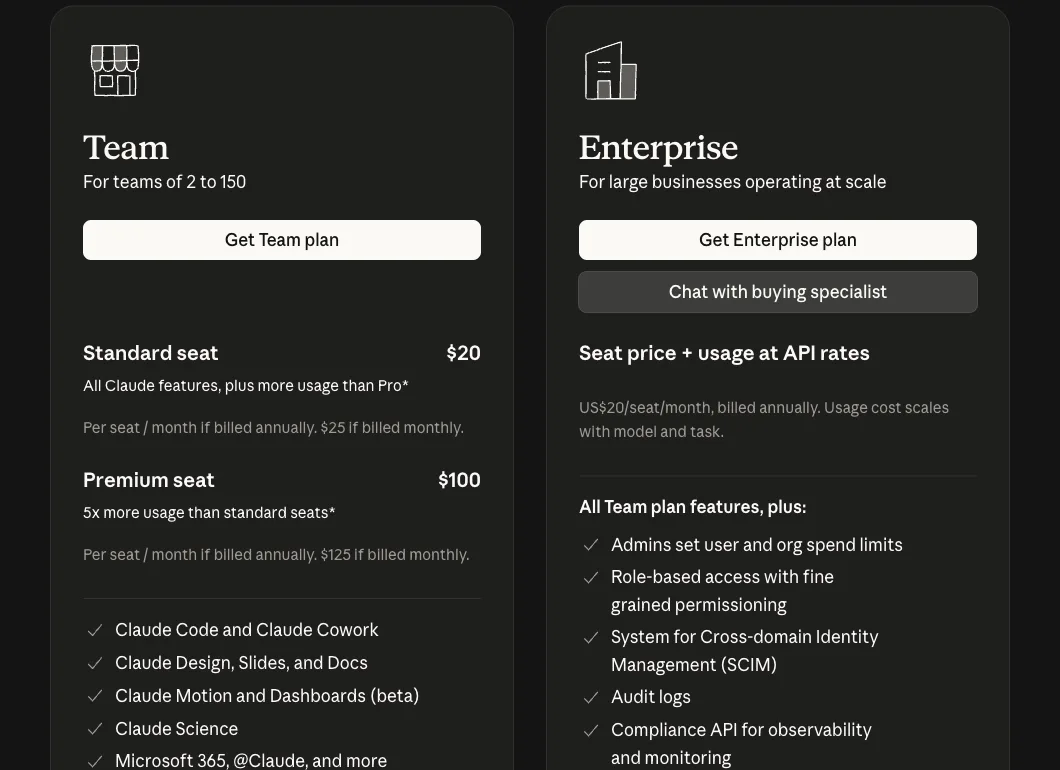
Claude's pricing page on October 14, 2026.
How it relates to Claude Code and Claude Duet. Claude Code is Anthropic's agent for software engineering. Cowork applies the same approach to everything else. Claude Duet, opened as a research preview on October 21, is a separate proactive agent for one person, available by waitlist to US Pro and Max subscribers and, per its help article, not on Team or Enterprise plans yet. Our Claude Duet alternatives guide covers that one. For a shared agent, the Team plan also includes @Claude in Slack, where "Within a given Slack channel, there's one Claude that interacts with everyone," per Anthropic's Claude Tag announcement.
Why teams look for a Claude Cowork alternative
None of what follows is a flaw. It is the shape of an agent built for the person driving it, and it matters once a second or third person depends on the work.
A person starts the work. Cowork waits for someone to hand it a goal or set up a schedule, then works on that task. Scheduled tasks are real and useful, but each one belongs to the person who set it up. There is no roster of agents who each own a job, like the pipeline or the overdue invoices, and pass work between themselves.
Sessions belong to one account. Anthropic's getting started guide says "Sessions can't be shared with others, but you can share individual artifacts you create during a session." If the person who set up the weekly readout goes on holiday, a colleague can open the finished file, not the task.
Memory follows the person. Cloud sessions start from what Claude remembers from your chats, and what comes up in a task carries back to your chat. That is helpful for you. What Claude learns about a customer lives in one person's account, not with the company.
The team version is still rolling out. Anthropic's merged experience reached Pro and Max first. On Team, Cowork on web and mobile is in beta, and Enterprise admins enable it themselves.
Usage comes out of plan limits. Multi-step tasks use more of your allowance than chat, and Anthropic's guide says auto mode "consumes more of your usage limit than the other modes."
One lab's models. Cowork runs on Claude. For most knowledge work that is a strength. Teams with a policy about which lab sees which data, or that want a different model for a specific job, cannot switch inside Cowork.
Our personal agent vs business agent guide covers the difference in more depth.
One person's coworker, or a team that runs the work
There are two kinds of product on this list.
The first kind makes one person faster. Cowork, ChatGPT Work, Microsoft Copilot Cowork, Perplexity Computer, Manus, Grok Bot and OpenAI Dots all do this well. Someone hands over a task, the agent does it, and the work still belongs to whoever asked. Notion Custom Agents, Lindy and OpenClaw are variations: shared helpers or agents you build and maintain yourself.
The second kind does the work for the company. A team of agents owns recurring jobs in sales, marketing and operations, coordinates without you in the middle and brings you only the decisions. You still hire people as the company grows. Each person just carries far more of it. That is what Dock is built for, and it is the bet behind small teams, big companies.
A quick test: if most of your requests start with "can you make me a," a coworker like Cowork is probably enough. If you keep wishing someone owned the follow-ups or the content calendar every week, without being asked, you are describing a team.
How we picked
We read the pages that rank for "Claude Cowork alternatives" this month, including DataCamp, Composio, gradually.ai and Eigent, and kept the tools a business owner would realistically shortlist. ChatGPT Work, Microsoft Copilot Cowork, Perplexity Computer and OpenClaw appear on most of them. We added the agents founders compare in our other guides, and left coding-first tools to the end, since Cowork is built for work that is not code.
Each tool was judged on five questions that matter to a small team:
- Can more than one person use the same agents and see the same work?
- Does the agent keep working on a schedule, without someone starting each task?
- What does it cost for a team of five, in plain dollars?
- Where does the agent run, and who controls what it can touch?
- Does it ask a person before sensitive actions?
Claude's details come from Anthropic's product page, pricing page, announcement and help center, checked on October 22, 2026. OpenAI's own pages blocked our automated checks, so ChatGPT Work facts come from OpenAI's learning site and launch coverage from July 9, 2026, and the dates are marked. Other prices were checked on the vendor's own page between October 13 and 22, 2026. We did not run paid trials. Screenshots carry their own capture dates. Prices change, so check the linked page before you buy.
Where Dock is the better fit
Cowork is a strong coworker for one person. These are the reasons we think a team of agents suits a company that wants recurring work run, not just done on request.
Each agent owns a standing job. Each Dock agent has a name, a role, a reporting line and permissions. A lead research agent finds buyers and hands them to an outbound agent, and an operations agent chases invoices, without anyone starting each task. A Chief of Staff runs the team, and you can reach them by email or iMessage. Cowork works on the task one person hands it.
The work is visible to the team. Dock agents work in shared workspaces your people can open, check and pick up. Cowork sessions stay in one account, and colleagues see the artifacts you share.
The memory belongs to the company. What Dock agents learn goes into the Company Brain, so it stays when someone leaves or you change models. What Cowork learns lives in one person's Claude memory.
You keep Claude, and add choice. Dock agents run on Claude models first and by default, with models from OpenAI and other labs a menu pick, so your writer can stay on Claude while another agent uses something else.
The agents work on a schedule. Agents run on your Mac or in the cloud, where cloud agents work 24/7 on schedules, with 2,000+ platforms built in plus the apps you connect. Shawn Dej, CEO of YourStory AI, runs an eight-agent sales org in Dock that works 400+ schools and 150+ community colleges. Every send waits for his OK, which he gives by text.
Pricing counts people, with agents included. Dock is per person: $20, $100 or $200 a month with 5, 10 or 20 always-on agents, as of October 2026. Claude bills a seat, and Cowork draws on that seat's usage limits.
Where Dock is not the right pick
- You want one strong coworker for your own files, research and documents. Cowork does that very well, and if you already pay for Claude Pro, Max or Team, it is already in your plan.
- Your work is mostly one-off deliverables. A deck, a research memo or a spreadsheet model is exactly what Cowork, ChatGPT Work, Manus and Perplexity Computer are built to produce. You do not need a team of agents for that.
- You need local files and desktop apps handled on every operating system. Cowork's desktop app works on macOS and Windows. Dock's local agents need a Mac, so a Windows team should plan on Dock's cloud agents.
- You want to design and wire every step yourself, or self-host. Notion Custom Agents or OpenClaw give you more control over each agent.
- You need compliance paperwork today. Dock is a young company, and its SOC 2 Type II report is not yet attested. Anthropic's pricing page lists a HIPAA-ready offering on Enterprise, and Manus says it holds SOC 2 Type II. If you need a completed report or a signed BAA now, look elsewhere.
Won't the big AI labs just build this?
They may. The labs are strong and moving fast: OpenAI shipped ChatGPT Work in July and Dots in September, Microsoft made Copilot Cowork generally available for work accounts, and Anthropic merged Cowork into Claude in September and opened Duet in October. Anthropic says Duet is coming to Team and Enterprise later, so more team features may well come. Today, what each lab ships runs on its own models and is built around one person's account or one general agent per channel. Our bet is that a company will want a team of agents with roles and a reporting line, a memory the business owns, and the freedom to use whichever lab's model is best for each job. That is the layer Dock builds. Better models from the labs help Dock agents too, Claude included. This is our reasoning, not a certainty.
Is the category crowded? Yes. Most products in it are coworkers for one person, like Cowork and ChatGPT Work, or builders you configure, like Notion Custom Agents and OpenClaw. Dock aims at a narrower job: a team that runs specific work end to end, like lead generation, follow-ups and collections.
Claude Cowork alternatives compared
| Tool | Best for | Price (as of Oct 22, 2026) | Team features | Where agents run |
|---|---|---|---|---|
| Claude Cowork (reference) | One person's research, analysis and documents | Pro $20/mo ($17 billed annually); Max from $100; Team $25 per seat ($20 billed annually) | Admin access by team, spend limits; sessions not shareable | Anthropic's cloud, plus your desktop for local files |
| Dock | Companies that want a team of business agents | $20, $100 or $200 per person a month with 5, 10 or 20 always-on agents | Shared workspaces, Chief of Staff, Company Brain | Your Mac or the cloud; cloud agents 24/7 |
| ChatGPT Work | Teams already on ChatGPT | Included with ChatGPT plans; Pro from $100/mo | Admin controls on business plans | OpenAI's cloud, or your computer |
| Microsoft Copilot Cowork | Companies on Microsoft 365 | Copilot Business $21 per user a month billed annually ($18 first-year promo), Cowork billed by usage | Tenant admin, plugins deployed by admins | Inside Microsoft 365 |
| Notion Custom Agents | Teams that run on Notion | Business $20 per member a month; agents $10 per 1,000 credits | Share agents with people, groups or the workspace | Inside Notion and Slack |
| Perplexity Computer | Research-heavy work | Max $167/mo billed annually; Enterprise Pro $40 per seat | Org credit pool with admin limits | Perplexity's cloud |
| Manus | One-off decks, reports and sites | Team from $20 per seat a month | Pooled credits, shared projects, free guests | Manus cloud sandbox |
| Grok Bot | Power users already on a Grok plan | Premium $30/mo, Super $100, Ultra $200; Teams $30 per user | Team Bots in public beta, memory kept per user | One persistent cloud computer per user |
| OpenAI Dots | One always-on agent per person | Included with ChatGPT Pro ($100 to $500) or a Business Premium seat ($125) | One dot per person; only the owner can direct it | OpenAI's cloud computer |
| Lindy | One shared helper in Slack | Team from $29.99 per active user a month for 3,000 credits | Pooled credits, every active user billed | Lindy cloud, in Slack |
| OpenClaw | Technical teams that self-host | Free, MIT licensed; you pay for models | Shared gateway sessions | Your own machines |
The new model: a team that runs the work
1. Dock
Dock is where businesses hire AI agents for business work: sales, lead generation, marketing and operations. Each agent has a name, a role, a reporting line and permissions, and they hand work to each other. Every account starts with a Chief of Staff who runs the team, so you manage one conversation instead of ten, and you can reach them by email or iMessage. You hire ready-made specialists from the Agent Marketplace for the jobs your business needs, such as finding leads, running outbound, publishing content or chasing overdue invoices. Dock is backed by Y Combinator (S26).
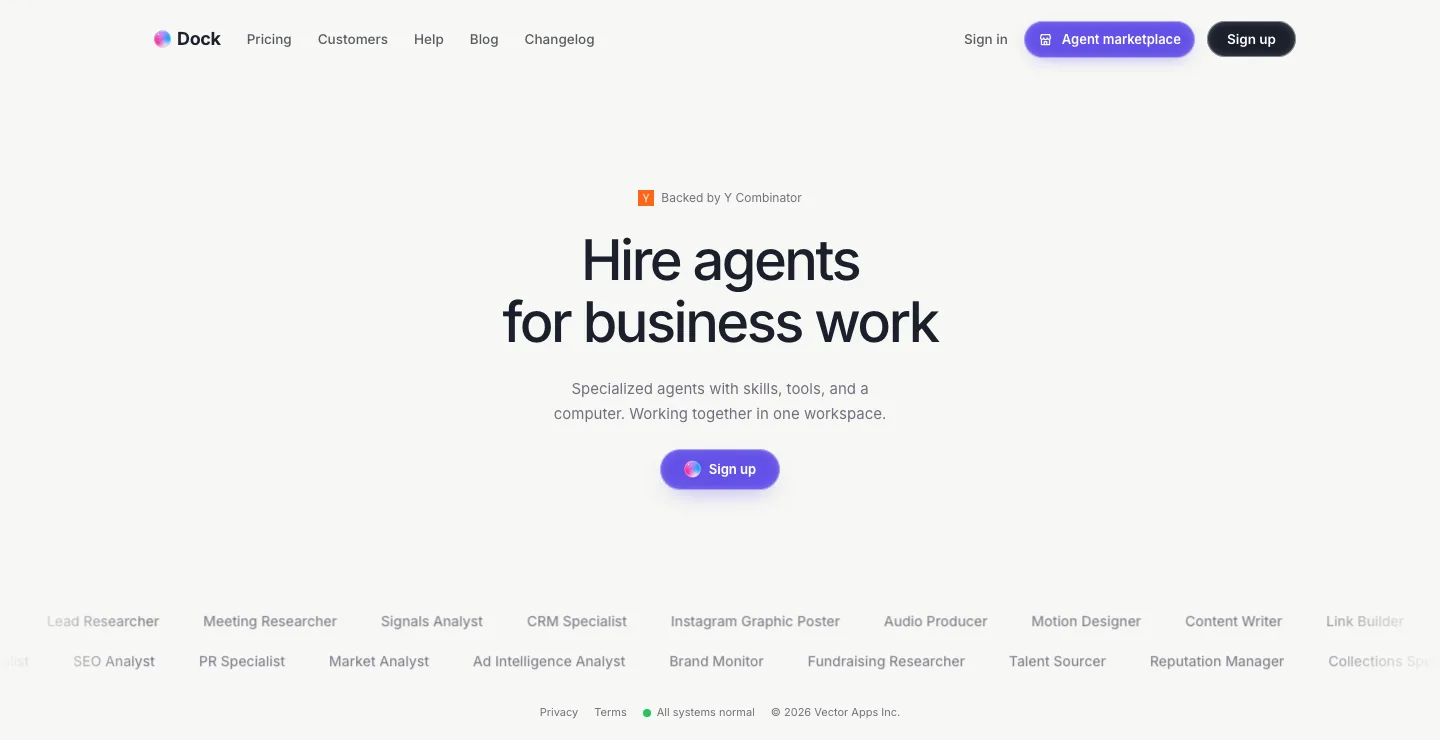
Dock's homepage on October 19, 2026.
What the agents learn goes into the Company Brain, so it stays with the company. Each agent runs on your Mac or in the cloud, where cloud agents work 24/7 on schedules, on the model that suits their job, from Anthropic, OpenAI or other labs. As of the October 13 release, agents reach 2,000+ platforms built in, plus the apps you connect, and per-agent permissions keep sensitive actions waiting for a person.
Price: per person per month, per the Dock pricing page, as of October 2026. Starter is $20 with 5 always-on agents, Standard is $100 with 10, and Scale is $200 with 20.
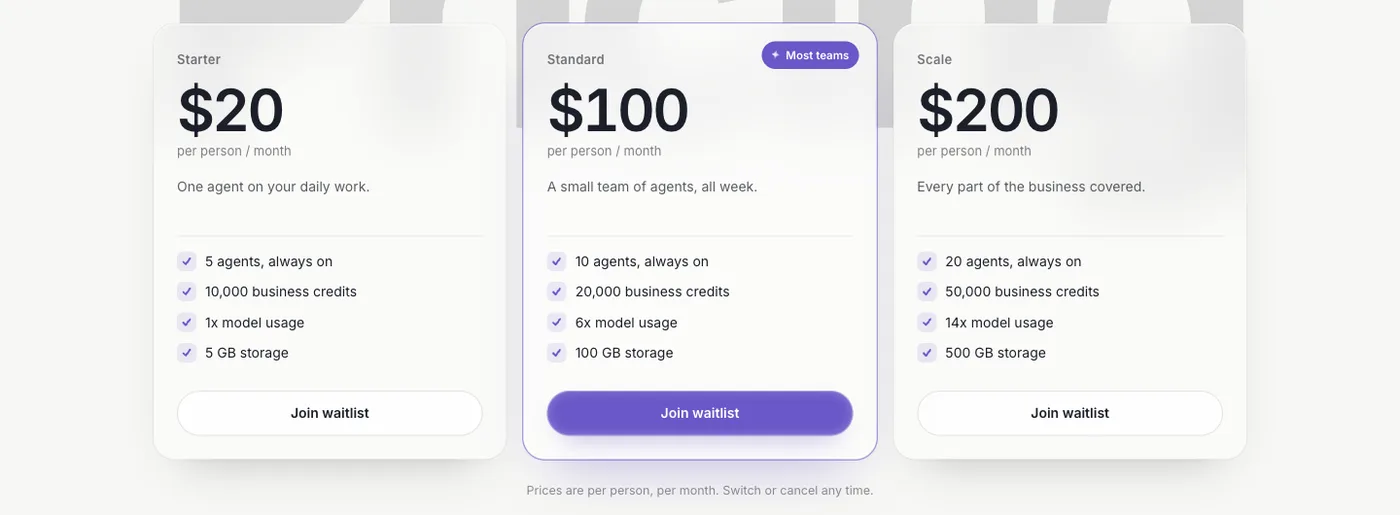
Dock's pricing page on October 14, 2026.
Does well: agents who own recurring jobs and work on a schedule rather than waiting to be asked, a Chief of Staff keeping them coordinated, and a memory the company keeps. If your team likes Claude, your agents can keep running on it.
The catch: Dock is a young company. SOC 2 Type II is not yet attested, local agents need a Mac, and Dock is not built for one person's ad hoc document work the way Cowork is.
Best for: startups and agencies that want recurring sales, marketing and operations work run by a team of agents, with people approving what goes out.
Hand-it-a-task agents from the big platforms
2. ChatGPT Work
OpenAI launched ChatGPT Work on July 9 as an agent for work "more complex than a typical chat request," per PYMNTS. It acts across your apps and files, keeps working on a project for long stretches, and produces finished spreadsheets, slides and documents. Trending Topics wrote that it "mirrors" Cowork's logic "almost feature for feature." OpenAI's own pages blocked our automated checks, so these details come from OpenAI's learning site and launch coverage dated July 9, 2026.
Price: at launch, Work rolled out on web and mobile to Pro, Enterprise and Edu, then Plus and Business, and the desktop app offers it on every plan, including Free, per the same coverage. ChatGPT Pro starts at $100 a month per OpenAI's Pro tiers page, as checked for our earlier guides.
Does well: OpenAI's Work guide says cloud tasks keep running because "your computer doesn't need to be awake," scheduled tasks can "repeat, monitor, or refresh something over time," and you can "approve important actions." Per Trending Topics, admins control access, company context, connected tools and permitted actions.
The catch: it is the same shape as Cowork: a person hands it a task and reviews the result, and it runs on OpenAI's own models.
Best for: teams that already run on ChatGPT and want a Cowork-style agent there.
3. Microsoft Copilot Cowork
Copilot Cowork carries out tasks across Microsoft 365: it "sends emails, schedules meetings, creates documents, posts in Teams, and manages your calendar." It runs prompts on a schedule and on events like a new email, and Microsoft says "You approve each action before it happens." Cowork for work and school accounts is generally available.
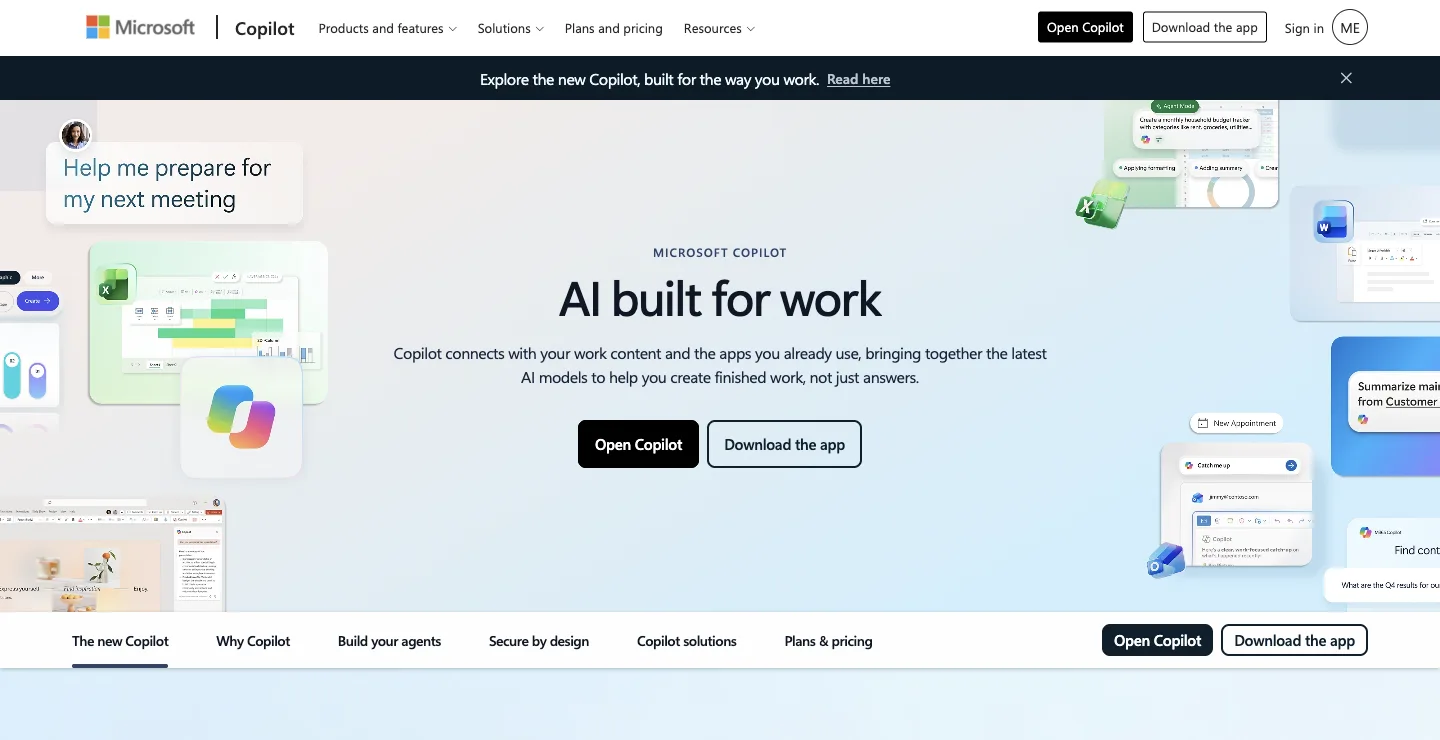
Microsoft's Copilot page on October 18, 2026.
Price: per Microsoft's pricing page, as of October 22, 2026, Copilot Business is $21 per user a month paid yearly, discounted to $18 for the first year on annual plans bought by December 31, 2026, or $25.20 paid monthly, as an add-on to a Microsoft 365 business plan. Cowork itself is listed as "Usage-based," billed in Copilot Credits.
Does well: your mail, calendar and files are already there, and approvals show a risk level for sensitive actions.
The catch: the meters stack, with a seat license plus usage for Cowork, and it works on each person's own Microsoft 365 data.
Best for: companies already on Microsoft 365 that want each person helped in Outlook, Teams, Word and Excel.
4. Notion Custom Agents
Notion's Custom Agents "live inside Notion and run on your instructions." They read pages, databases and some connected apps, run on schedules or on Notion and Slack triggers, and can post reports or send messages. You can share an agent with individuals, groups or the whole workspace, and pick a model per agent, including Claude, GPT, Gemini and Grok.
Price: the Notion pricing page lists Business at $20 per member a month, and Custom Agents need the Business or Enterprise plan. Agents are "Free to try, then $10 per 1,000 monthly Notion credits," and per Notion's credit help page monthly credits "don't roll over."
Does well: agents that the whole workspace can share, a model choice per agent, and triggers that run without anyone asking.
The catch: you write each agent's instructions and maintain them, and they work best on what lives in Notion.
Best for: teams whose docs, projects and wikis already run on Notion.
Research and deliverables
5. Perplexity Computer
Perplexity Computer is Perplexity's agent for multi-step work: it researches across the web and connected apps, then builds documents, dashboards and apps in the background.
Price: per Perplexity's pricing page, as of October 22, 2026, Pro is $17 a month billed annually and Max is $167 a month billed annually with 10,000 monthly Computer credits. For teams, Perplexity's Enterprise guide lists Enterprise Pro at $40 per seat a month and Enterprise Max at $325.
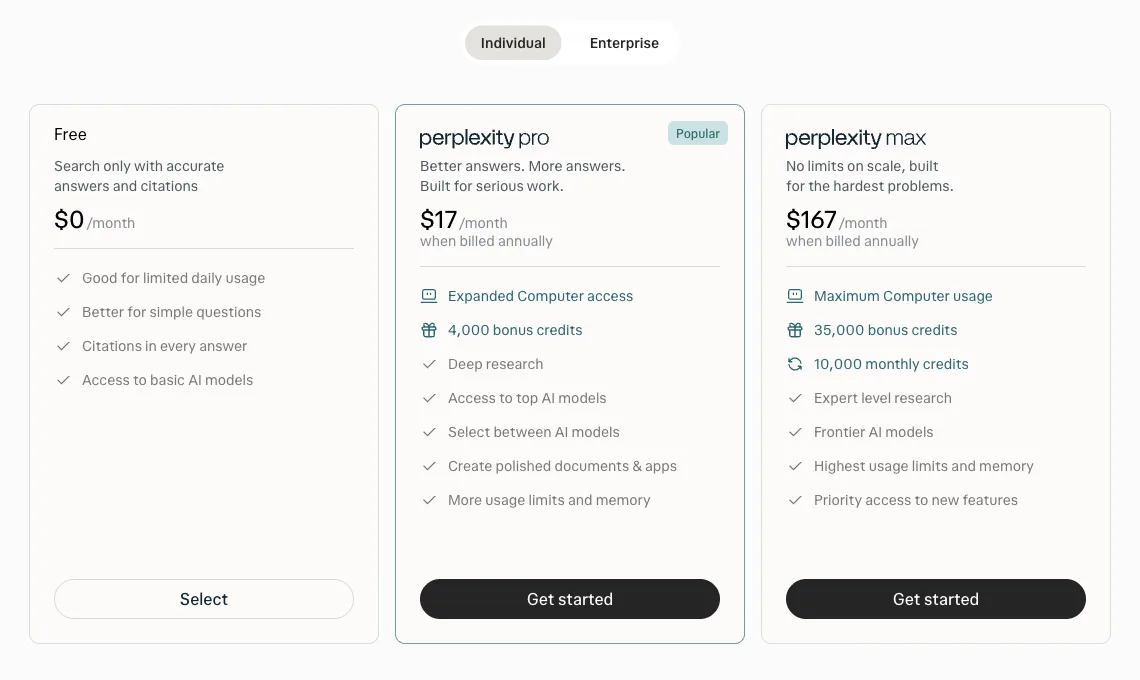
Perplexity's pricing page on October 14, 2026.
Does well: research quality and citations you can check.
The catch: Perplexity's admin guide lists 500 monthly Computer credits per Enterprise Pro seat, so heavy agent use means buying more. It is strongest at finding and assembling information, less at owning an ongoing job.
Best for: teams whose Cowork use is mostly research memos and market scans.
6. Manus
Manus is a general agent that turns a goal into a finished deliverable, such as a research report, a slide deck, a website or a chart, working in its own cloud sandbox and often splitting a job across sub-agents.
Price: per manus.im/team, as of October 22, 2026, Manus Team starts at $20 per seat a month or $200 per seat a year, with 4,000 credits per seat a month pooled across the team. SSO is free from 30 seats and a flat $150 add-on below that, and guests who view and comment are free.
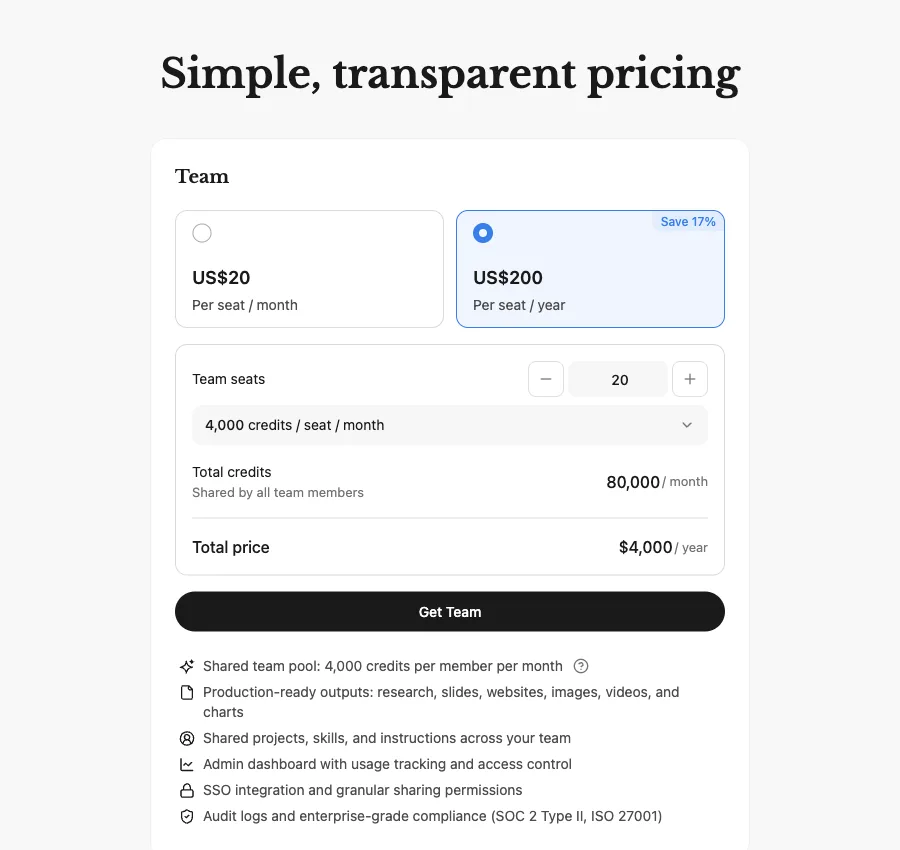
Manus's Team pricing on October 14, 2026.
Does well: a practical team plan with pooled credits and shared projects, and Manus says it holds SOC 2 Type II.
The catch: it is built around runs you define, so it suits tasks with a clear end more than an agent holding a recurring job, and credit costs vary with each task.
Best for: polished one-off deliverables on demand.
Personal and always-on agents
7. Grok Bot
Grok Bot from SpaceXAI gives each named Bot a persistent cloud computer, learns a routine when you do it once, runs routines on a schedule, and lets Bots pass work between each other in a shared thread.
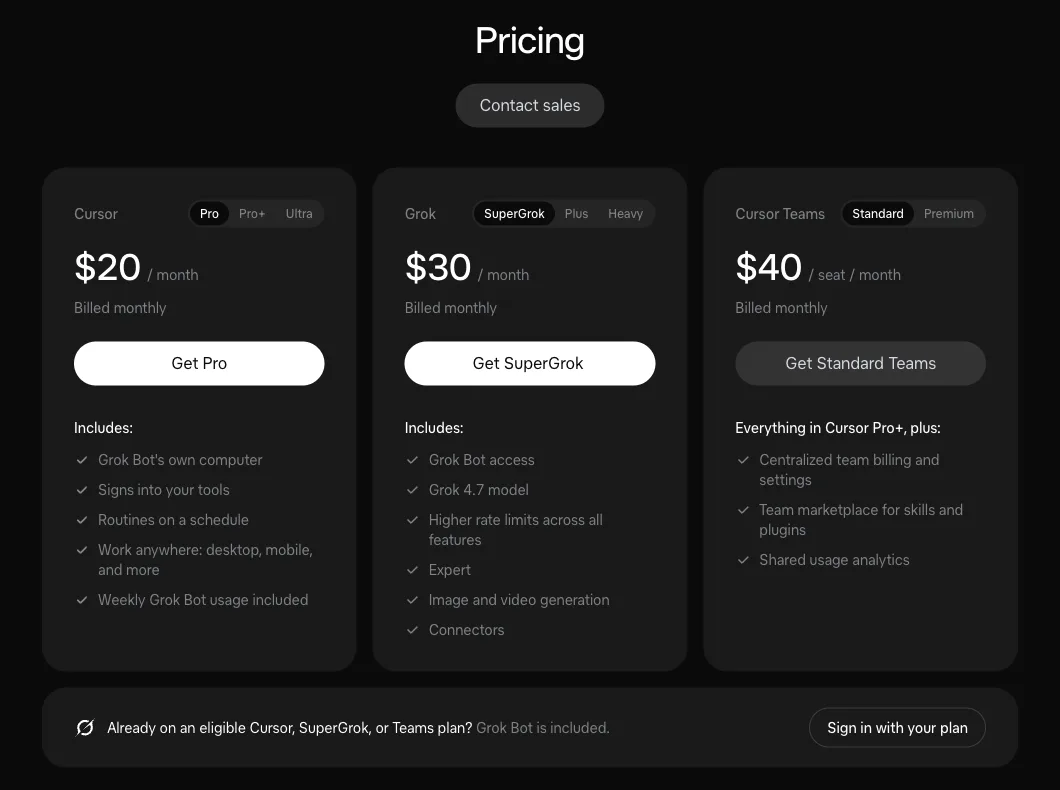
The pricing section of Grok Bot's page on October 14, 2026.
Price: as of October 22, 2026, Grok Bot is included with SpaceXAI's Premium at $30 a month, Super at $100 or Ultra at $200, or Teams at $30 per user a month, with extra usage billed on top.
Does well: the most work-shaped of the big-lab agents, with routines, triggers and bot-to-bot messaging.
The catch: Grok Bot's own FAQ says all of one person's Bots share one cloud computer, and "Isolation is per user, not per Grok Bot." Team Bots, in public beta since September 28, keep separate memories for each user. More in Dock vs Grok Bot.
Best for: a power user already on a Grok plan who wants several bots that keep working with the laptop closed.
8. OpenAI Dots
OpenAI launched dots on September 29. Per OpenAI's getting started article, a dot is an always-on agent with its own cloud computer that keeps working on a goal between conversations, and you can reach it in ChatGPT, Slack or Microsoft Teams.
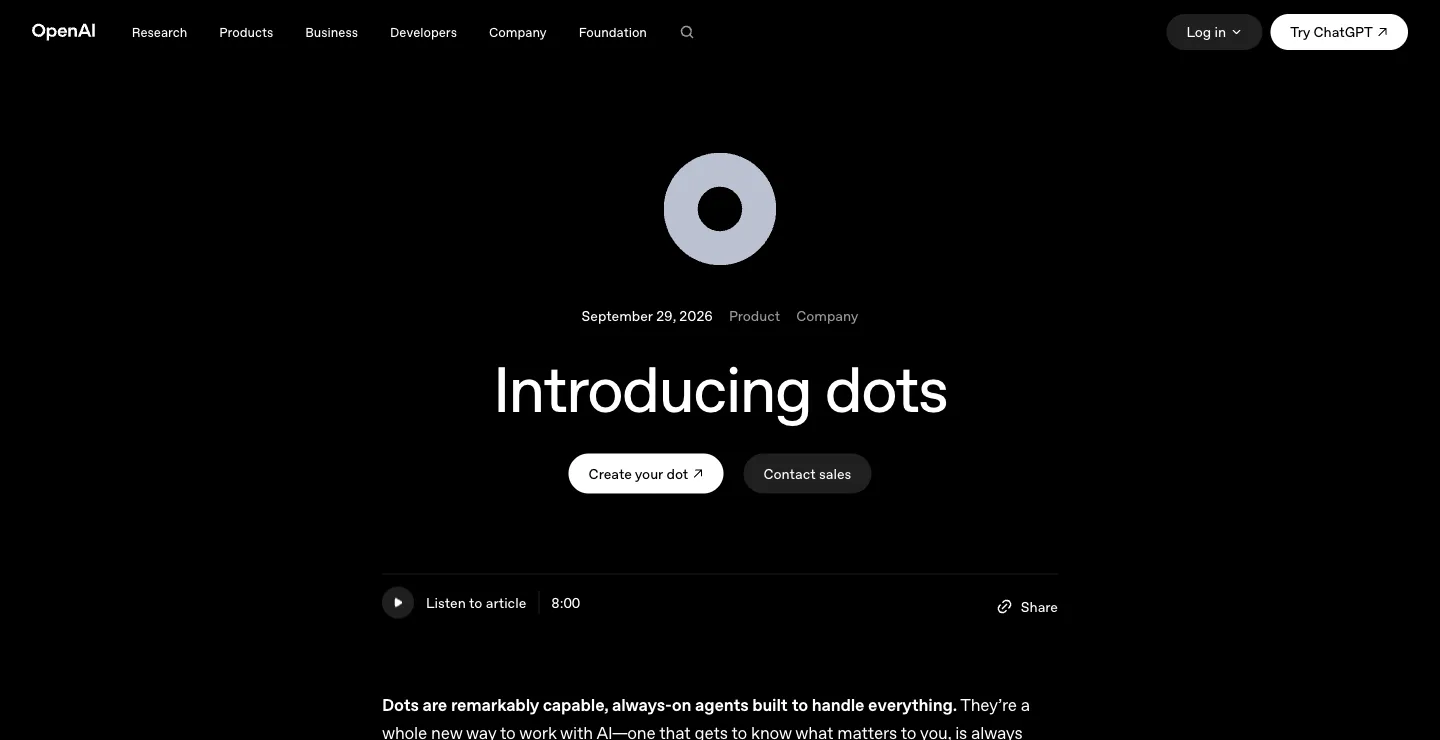
OpenAI's dots announcement on October 18, 2026.
Price: your first dot is included with ChatGPT Pro at $100, $200 or $500 a month, per the Pro tiers page, or with a Business Premium seat at $125 a user a month, or $100 billed annually, with a two-seat minimum, per OpenAI's Business FAQ. Pro dots are not offered in the EEA, Switzerland or the UK.
Does well: unlike a Cowork task, a dot keeps a goal going between conversations, and Custom Rules let you allow, block or require approval for specific actions.
The catch: OpenAI's workspace admin guide says "Only a dot's owner can direct it." More in our OpenAI Dots alternatives guide.
Best for: people on ChatGPT Pro or Business Premium who want one always-on agent of their own.
Shared helpers and self-hosted agents
9. Lindy
Lindy is one shared helper in Slack threads and mentions, plus iMessage and email, with scheduled routines, 1,500+ integrations and approvals before anything with outside impact.
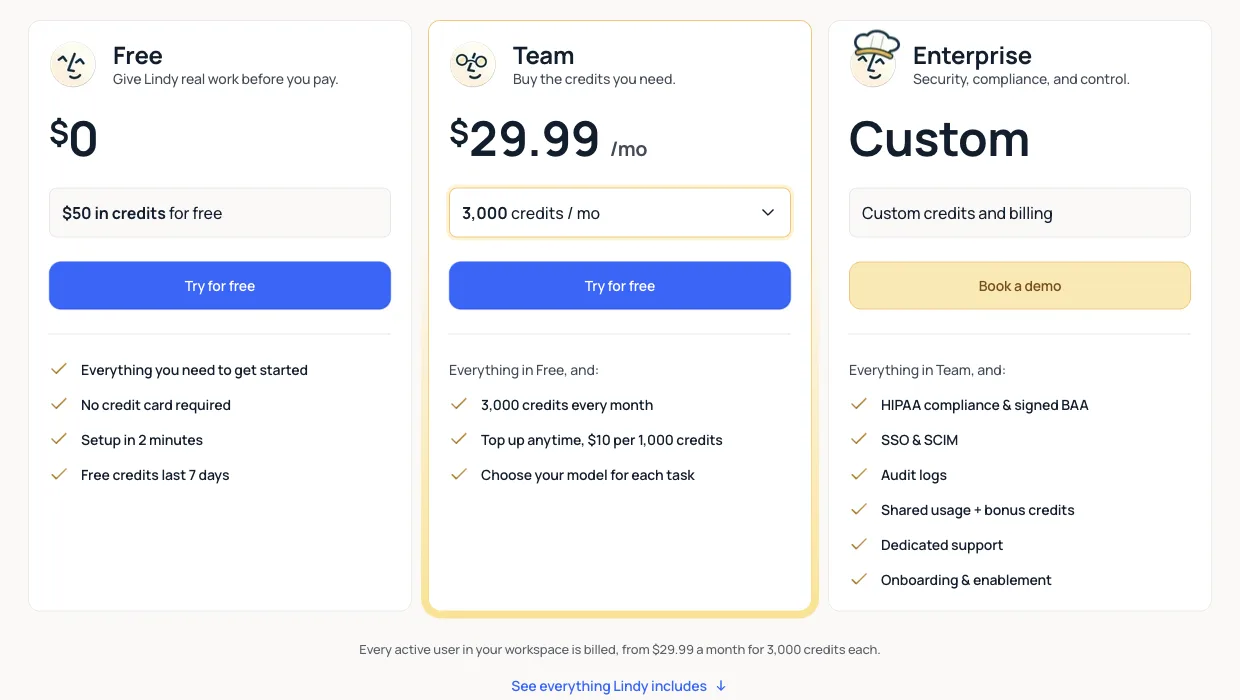
Lindy's pricing page on October 14, 2026.
Price: as of October 22, 2026, Lindy starts you with $50 in free credits that last 7 days. Team starts at $29.99 a month for 3,000 credits, pooled across the team, and "Every active user in your workspace is billed." Monthly credits don't roll over, and Enterprise adds SSO, SCIM, audit logs and a signed BAA.
Does well: inbox, meeting and follow-up work in the place your team already talks, which Cowork does not cover on its own.
The catch: one helper answers everyone, every active user takes a paid seat, and credits are metered on top. More in our Lindy alternatives guide.
Best for: Slack-first teams whose main pain is inbox and meeting follow-up.
10. OpenClaw
OpenClaw is the open-source agent that runs on your own Mac, Windows or Linux machine and talks to you in WhatsApp, Slack, iMessage, Telegram and other chat apps. It appears on most Claude Cowork alternatives lists as the free option.
Price: the project describes itself on openclaw.ai as MIT licensed with "no subscription" and "no hosted tier." You pay for the models you connect and the machines you run it on.
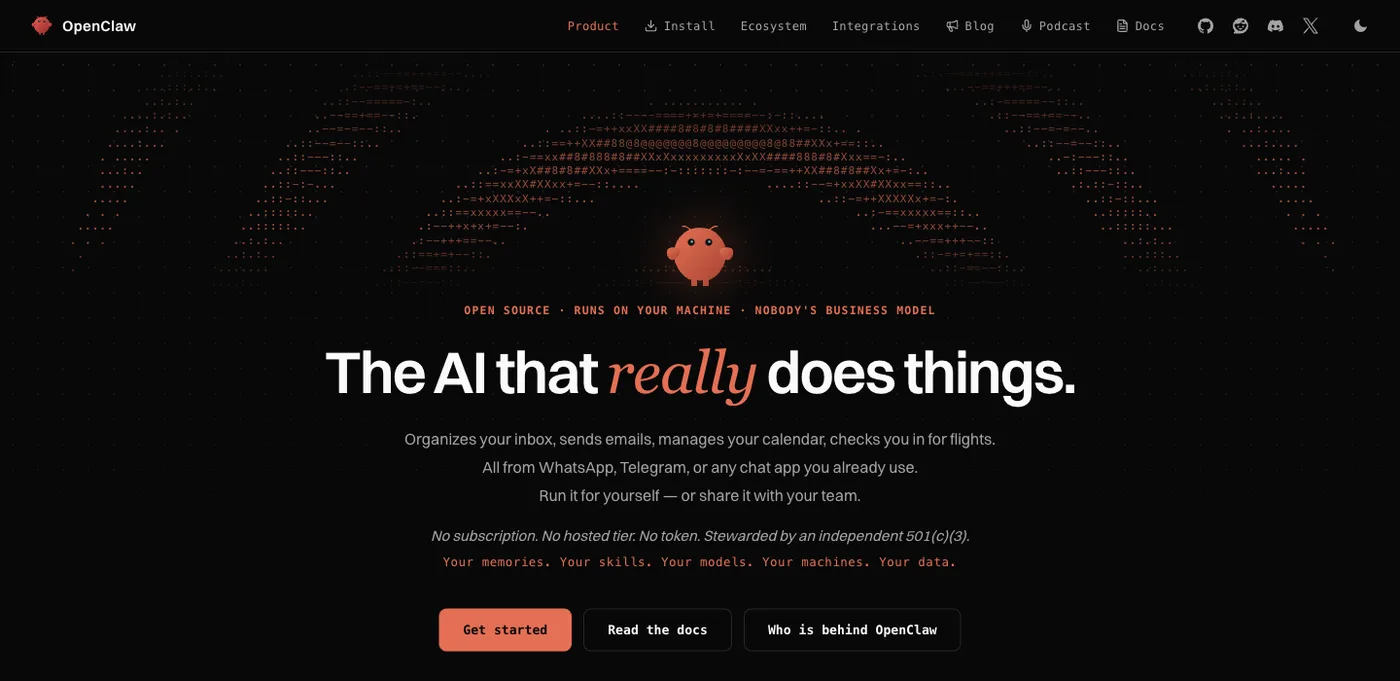
OpenClaw's homepage on October 14, 2026. The project has no pricing page.
Does well: your memory, skills and data stay on hardware you control, you bring any model, Claude included, and a shared gateway lets a team open and steer the same sessions.
The catch: someone on your team becomes its administrator. Setup, updates, security and tool access are all yours to manage.
Best for: technical teams that want full control over models, data and hosting.
Also considered
Claude Code is the better Anthropic pick if your work is software. Some guides suggest it as a Cowork alternative for people comfortable in a terminal. Claude Duet suits one US professional on Pro or Max who wants a proactive agent for their own day; see our Claude Duet alternatives. Zapier Agents have a free tier for everyone with 400 activities a month, Agents Pro from about $33.33 a month billed annually, and Zapier Pro from $19.99 a month billed annually, for teams that want agents across Zapier's app catalog. Open-source desktop projects like OpenWork show up on several ranking lists for people who want a Cowork-style app with their own model keys.
Claude Cowork vs Dock
Cowork is a coworker for the person driving it. Dock is a team of agents working for the business. Both can run on Claude.
| Claude Cowork | Dock | |
|---|---|---|
| Shape | One agent per person, working on tasks you hand it | A team of agents, each with a name, a role and a reporting line |
| Who starts the work | The person, or a schedule they set | Agents with standing jobs, coordinated by a Chief of Staff |
| Who can see the work | The account holder; shared artifacts | Everyone with access to the workspace |
| Memory | Your Claude memory | A Company Brain the company keeps |
| Models | Claude | The model that suits each job, Claude included, plus OpenAI and other labs |
| Where it runs | Anthropic's cloud, plus your desktop for local files | Your Mac or the cloud; cloud agents 24/7 |
| Price (Oct 2026) | Pro $20/mo; Max from $100; Team $25 per seat ($20 annually) | $20, $100 or $200 per person a month with 5, 10 or 20 always-on agents |
| Security paperwork | HIPAA-ready offering on Enterprise | SOC 2 Type II not yet attested |
Cowork is better for one person's own files, research and documents, from a Claude account you may already have. For work two or more people touch, which has to keep moving while you are out and which someone has to answer for, we think Dock is the better fit. Plenty of teams will use both: Cowork for each person's own work, and Dock agents running on Claude for the company. The case for that model is in hire agents, not headcount.
How to choose
| If you want | Choose |
|---|---|
| A team of agents that runs sales, marketing and ops for the company | Dock |
| A Cowork-style agent inside ChatGPT | ChatGPT Work |
| Tasks done across Outlook, Teams, Word and Excel | Microsoft Copilot Cowork |
| Shared agents that live in your Notion workspace | Notion Custom Agents |
| Research with citations | Perplexity Computer |
| Finished decks, reports and sites on demand | Manus |
| Several bots of your own on a Grok plan | Grok Bot |
| One always-on agent per person on ChatGPT | OpenAI Dots |
| One shared helper in Slack | Lindy |
| To self-host with any model | OpenClaw |
The AI agents for business guide explains how to pick the first job to hand over.
More comparisons: Claude Duet alternatives, OpenAI Dots alternatives, Meta Muse alternatives, Grok Bot alternatives, Lindy alternatives.
FAQ
What is the best Claude Cowork alternative?
It depends on the job. For the same hand-it-a-task agent from another vendor, ChatGPT Work and Microsoft Copilot Cowork are the closest matches. For a team that wants agents running standing jobs for the company, we think Dock is the better fit: you hire agents for sales, marketing and operations, a Chief of Staff coordinates them, and plans start at $20 per person a month with 5 agents always on. Dock agents can run on Claude models too. We build Dock, so weigh our view accordingly.
How much does Claude Cowork cost?
Cowork comes with Claude's paid plans. As of October 22, 2026, Claude's pricing page lists Pro at $20 a month, or $17 billed annually, Max from $100 a month, and Team at $25 per Standard seat a month or $20 billed annually, with Premium seats at $125, or $100 billed annually. Enterprise is $20 per seat a month billed annually plus usage at API rates, with a 20-seat minimum. Cowork uses your plan's limits faster than chat.
Is Claude Cowork still a separate product?
Not anymore. On September 16, 2026, Anthropic announced that Cowork and chat are merging into one Claude, rolling out on Pro and Max first, with Team and Free to follow. Claude's pricing page now says "Claude Cowork is now just Claude."
Can a team share Claude Cowork?
Partly. Cowork is on the Team plan, and admins can set access by team, spend limits and tool permissions. But Anthropic's guide says sessions can't be shared with others, only the artifacts you create, and Cowork on web and mobile is in beta on Team. For one shared Claude in Slack, the Team plan includes @Claude.
What is the difference between Claude Cowork, Claude Code and Claude Duet?
Claude Code is Anthropic's agent for software engineering. Cowork brings the same approach to knowledge work like research, analysis and documents. Claude Duet is a separate proactive agent for one person, in research preview by waitlist for US Pro and Max subscribers, and not yet on Team or Enterprise plans.
Does Claude Cowork keep working when my laptop is closed?
Yes, on Pro and Max. Since October 6, 2026, new Cowork tasks on those plans run in Anthropic's cloud, and scheduled tasks run with no device online. Work that needs your local files, browser or desktop apps still goes through the desktop app.
Won't Anthropic or OpenAI just build this?
They may. The labs are strong, they move fast, and Anthropic says Duet is coming to Team and Enterprise plans later. Today, what each lab ships runs on its own models and is built around one person's account or one general agent per channel. Dock is betting that a company will want a team of agents with roles and a reporting line, a memory the business owns, and the freedom to use whichever lab's model is best for each job. That is our reasoning, not a certainty, and Dock agents run on the labs' models, Claude included, so they improve as those models do.
In short: Cowork or another hand-it-a-task agent for one person's own work, a builder or self-hosted agent if you want to wire things yourself, and Dock if your company wants a team of agents running the work, on Claude or any other lab's models. If that last one is you, see how Dock works or start free.