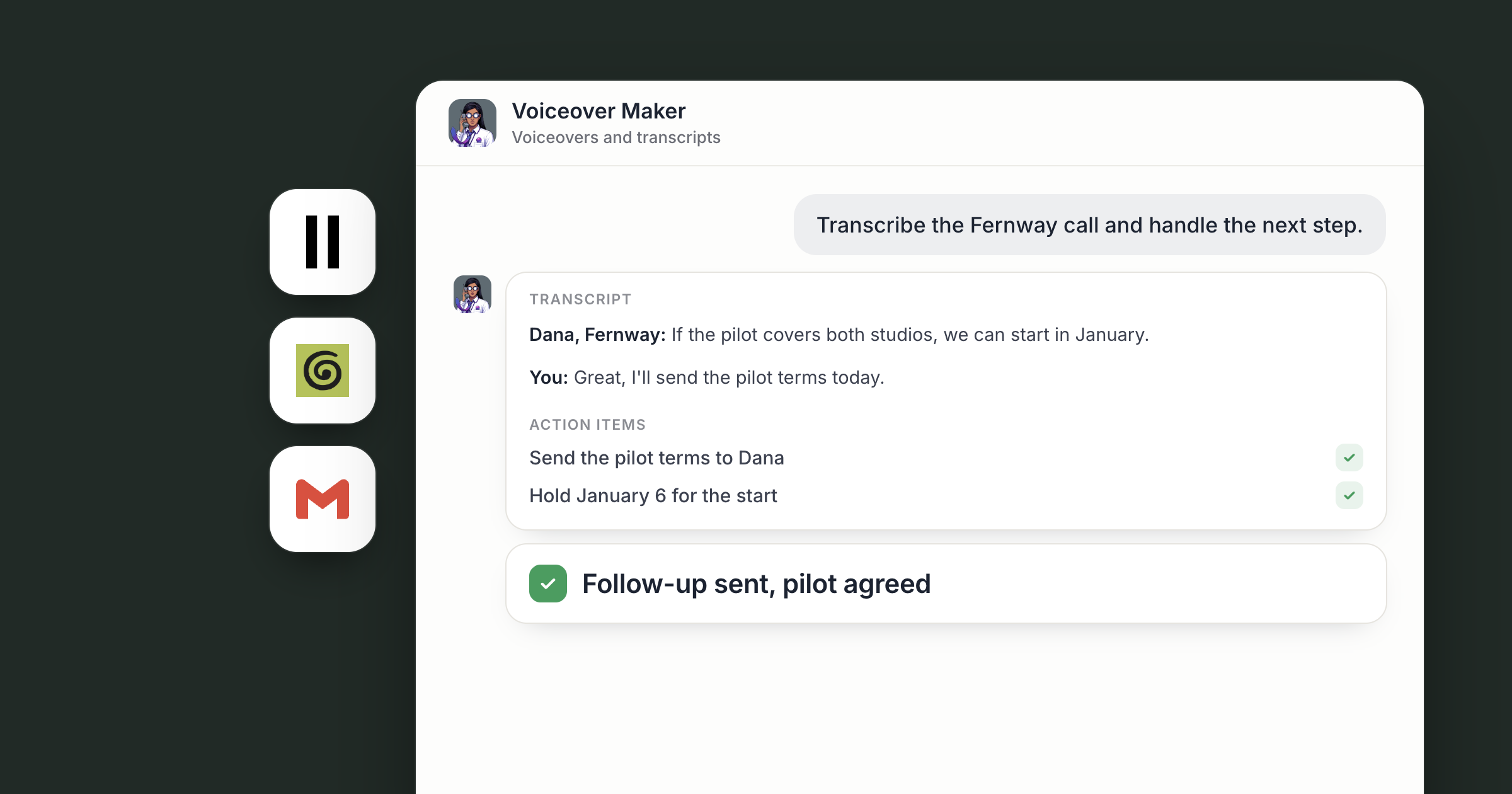
Say your founder has a call with Pinewood Clinics on Tuesday about a pilot. She drops the recording into the Files tab of your Sales workspace. Soon after, there's a transcript with speaker labels, a list of action items with an owner beside each, and a follow-up email in her Gmail drafts proposing a 60-day pilot at two sites. She edits a line and sends it. By Friday, the buyer has signed off on the pilot.
That work comes from Voiceover Maker, hired from the Dock Marketplace. Their card is about AI voiceover for business, and they voice your posts and scripts with ElevenLabs. They also transcribe recordings with speaker labels, and with a call recorder connected, they can work from your meeting notes too, which is where a customer call becomes a next step. You run the call, approve what goes to the customer and agree the deal.
If social is your main goal, the AI social media agent covers the wider playbook. This piece starts with the call and ends with the audio.
Screenshot coming: A transcript doc in the Sales workspace with speaker labels, an action items section with owners, and a link to the follow-up draft in Gmail.
Step 1: Hire Voiceover Maker and point them at your calls
A customer call only turns into a deal when someone does the follow-through, so hire the agent who will do it. Voiceover Maker's Marketplace card reads "Turns your posts and scripts into voiceovers and podcasts." Hire them and they open a chat, already briefed. Hiring a ready-made agent covers the steps.
Their voice work comes later in this piece. Start with the job that moves revenue: tell them which calls matter, for example every customer call where a pilot or a price comes up, and where the results should go, such as a Sales workspace your team shares.
Screenshot coming: Voiceover Maker's chat, with the owner's message describing which customer calls to work from and where the results go.
Step 2: Transcribe the call with speaker labels
The follow-through starts with an accurate record of what the buyer said. Drop a recording into the Files tab, say a customer call, an interview or a webinar, and the agent transcribes it with ElevenLabs speech to text.
The transcript comes back with word-level timestamps and labels for who is speaking, in more than 90 languages. The agent writes it into a doc, adds a short summary and pulls out the strongest quotes with their timestamps, so finding the moment the buyer named their timeline takes seconds.
Speech to text is one of Dock's paid tools. The agent runs it directly, it's billed in your Dock credits, and there's nothing to sign up for.
Screenshot coming: A transcript doc with speaker labels and timestamps, and a summary section at the top.
Step 3: Bring in your meeting notes
Plenty of calls never become a file you can drop in. If your team takes notes with a connected call recorder, connect it under Settings, Connections. It captures meeting transcripts and notes, and once it's connected the agent can search them.
That opens up requests like: "Find last week's customer calls where a pilot came up and pull what each buyer asked for." The agent searches your connected call recorder, collects the passages and lays them out in a doc with the meeting each one came from. A new connection starts open to all of your agents and can be limited to specific agents, and the Help article on the tools your agents can use explains how connections work.
Across a team, the calls come from everyone: the founder's sales calls, the customer success lead's check-ins, the webinar the marketing lead ran. Voiceover Maker is reachable by your org by default, so each of them can drop a file in the Files tab and ask for a transcript, with the results landing in one workspace the team can search. Whoever owns the customer decides what goes back to them.
Screenshot coming: A doc listing what buyers asked for, pulled from connected meeting notes, each with the meeting name and date.
Step 4: Turn the transcript into action items and a follow-up
A transcript earns its keep once it becomes a next step. Ask the agent to end every customer transcript with a list of action items, each with an owner and a date, and a short note of what the buyer agreed to and what's still open.
Then the follow-up. Connect Gmail under Settings, Connections, and ask the agent to draft the follow-up email from the transcript and leave it in your Gmail drafts: a thank-you, the next step in the buyer's own terms, such as a 60-day pilot at two sites, and the date you'll check in. You read the draft, change what needs your voice and send it. Agreeing the pilot is a person's call.
If you want this after every call, Dock's Library has a ready-made skill that pulls in new call transcripts, summarizes them and logs the follow-ups. It needs a call recorder connected.
Screenshot coming: The action items section of the transcript doc, with an owner and date beside each.
Step 5: Make an AI voiceover for business recaps, posts and podcasts
Once the deal is moving, the same agent handles audio. Ask them to voice the same short paragraph in a few ElevenLabs voices so you choose by ear, then use that one voice for everything, so every narration sounds like the same company.
ElevenLabs text to speech turns written text into natural-sounding speech, delivered as an MP3, and runs as a paid tool like speech to text. The uses add up: a narrated version of each blog post, the voiceover for a product video, a spoken walkthrough for new customers, such as the kickoff for a pilot. Before voicing anything, the agent prepares the text for listening. They spell out abbreviations, break up long sentences and smooth anything that reads well on screen but trips up out loud.
Most companies also have a podcast's worth of material in their posts, newsletters and talks. The agent drafts an episode script from it in a doc for you to edit, and voices it once you approve. Finished audio lands in the Files tab, named so anyone on your team can find it.
Screenshot coming: The Files tab with narrated MP3s listed by title, next to a doc tab holding a podcast script with the owner's edits.
Step 6: Draft LinkedIn posts from what was said
A good customer call can also shape what your company says in public. With LinkedIn connected, the agent drafts posts from transcripts and episodes in your voice: a lesson from a customer call, a sharp line from the podcast, a short recap of the webinar.
The posts are drafted for the team, posted on the schedule the team approves. If a draft quotes a customer, someone on your team checks with that customer first. That judgment call belongs to people. For a daily posting routine, see one on-brand social post a day.
Screenshot coming: A doc of LinkedIn post drafts, each linked to the transcript it came from, with the owner's approval comments.
What lands where
- Next steps from each call: action items with owners in the transcript doc, and the follow-up in your Gmail drafts for you to send.
- Transcripts: docs with speaker labels, timestamps, a summary and key quotes.
- Meeting notes: stay in your connected call recorder. The agent reads them through the connection.
- Voiceovers and episodes: MP3s in the Files tab, with scripts in a doc you edit and approve.
- LinkedIn posts: drafted for the team, posted on the schedule the team approves.
- Audio work: ElevenLabs, run from Dock as a paid tool.
Related
- How teams run on Dock
- AI product videos for social, every week
- AI social media posts for business: one on-brand post a day
FAQ
Can the agent turn a call recording into next steps? Yes. Drop the recording into the Files tab and the agent transcribes it with speaker labels. Ask them to list action items and draft the follow-up, and you decide what goes to the customer.
Do AI voiceovers sound natural? ElevenLabs is built to produce natural-sounding speech in a range of voices. You hear samples and pick the voice before the agent uses it.
Can the agent transcribe recordings in other languages? Yes. ElevenLabs speech to text handles more than 90 languages, with speaker labels and word-level timestamps.
Do I need an ElevenLabs subscription? No. ElevenLabs runs as a paid tool inside Dock.