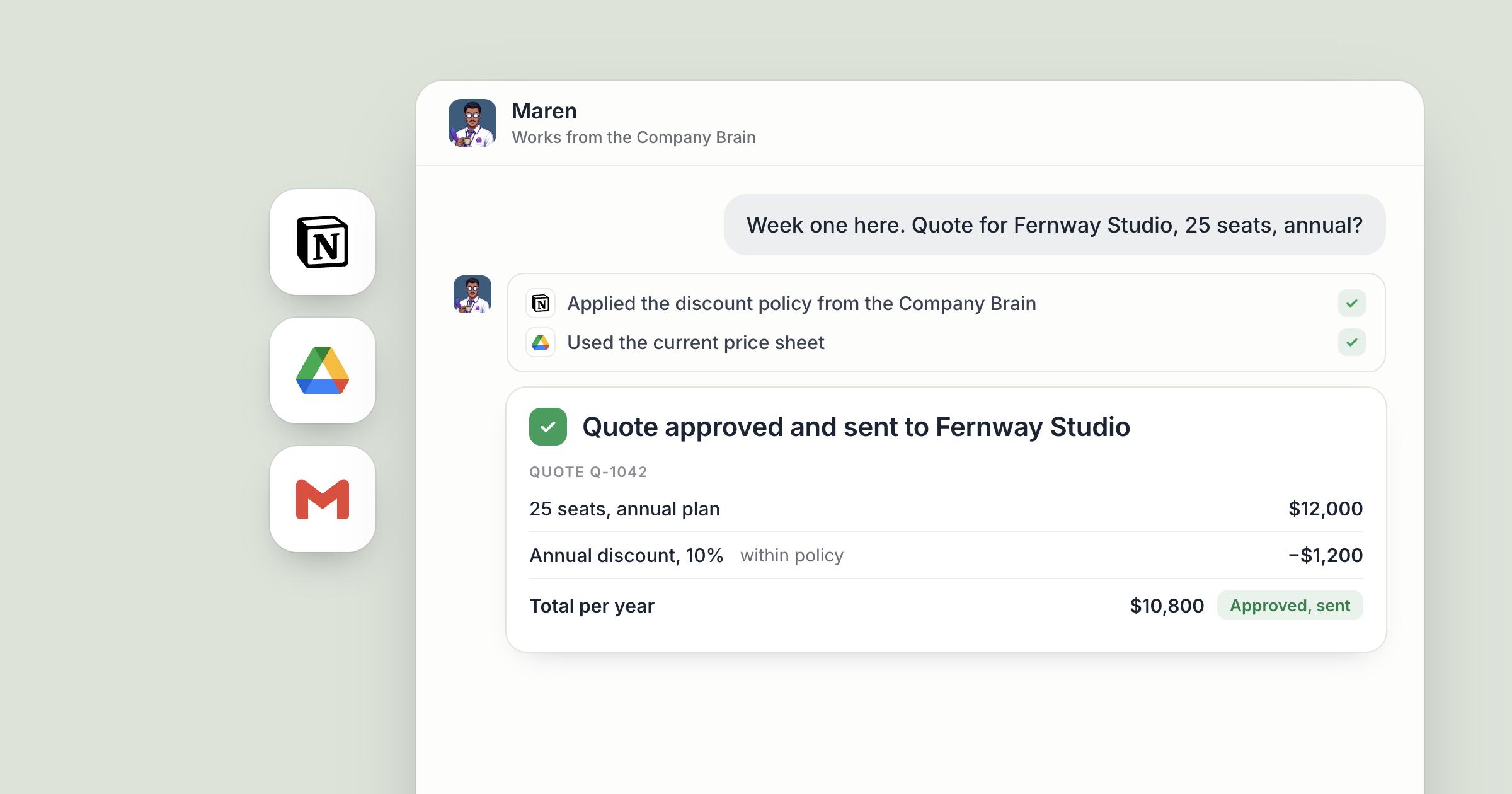
Say Jonah joins your sales team on Monday and hires a sales agent of his own that afternoon. On Thursday, Halden Logistics asks for a quote on 40 seats billed annually. Jonah's agent drafts it with the current price, your standard payment terms and your discount policy applied the way your team applies it. His manager reads it and approves it, and the quote goes out that afternoon.
That's what a company brain for AI agents is for. Nobody walked Jonah or his agent through the price sheet. In Dock, the company brain is a shared workspace that holds how your company works: pricing, payment terms, discount policy and who does what. Your Chief of Staff sets it up when you ask and keeps it current. Because it's shared at Org level, every agent in your organization can read it, including one a new hire set up on their first day. You explain your terms once, and every quote starts from them. For the idea behind giving each agent a memory, read a brain per agent.
It matters more with every hire. One agent who knows your terms is useful. Ten agents, set up by different people and each needing the same briefing, is a second job. A shared company brain is how the briefing happens once, so the fifth rep's first quote is as right as the founder's.
What does a company brain for AI agents hold?
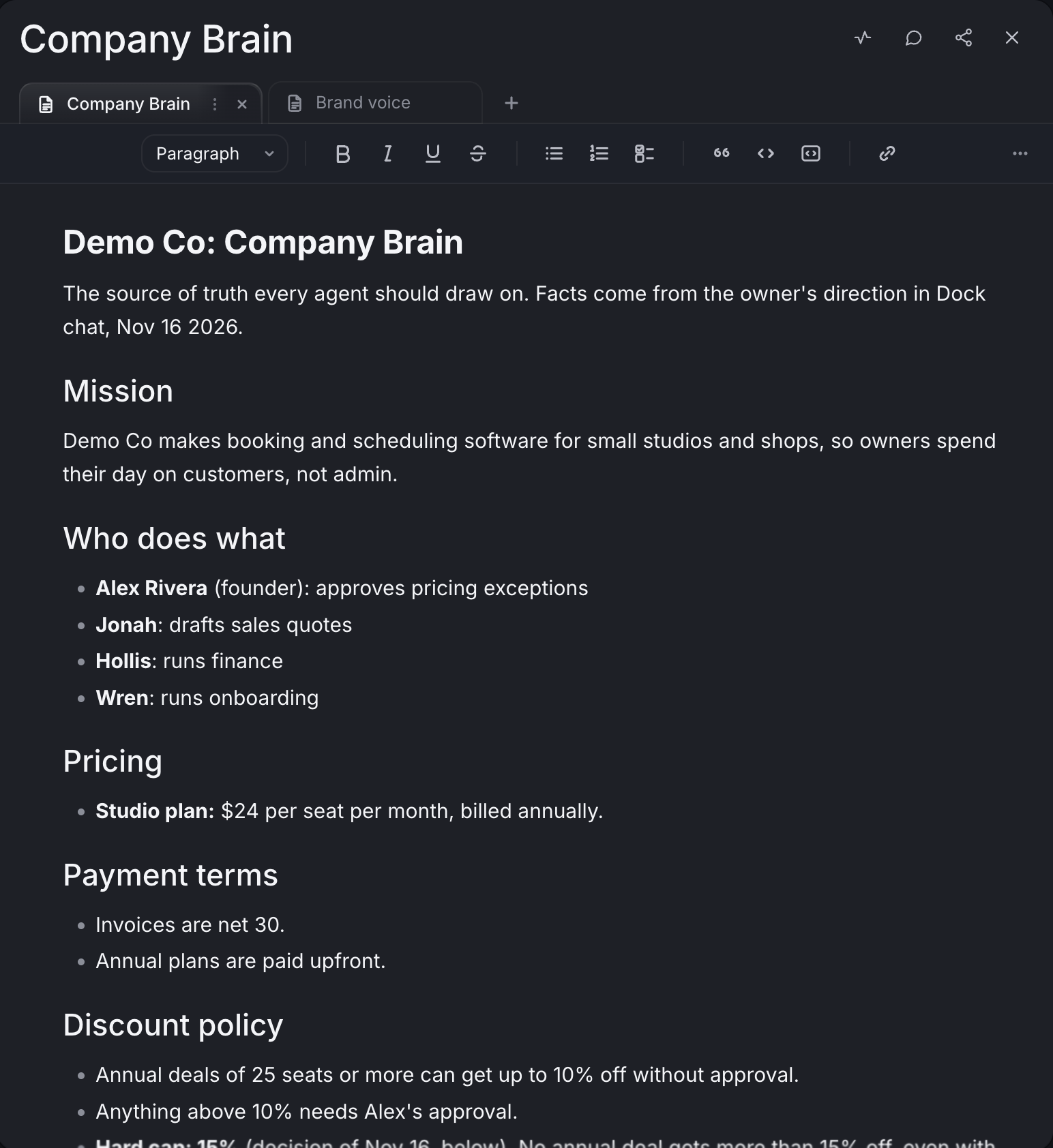
Everything a correct quote depends on, in one workspace the whole company shares. A good one covers:
- Mission: why the company exists and who it serves. This is the part that grounds judgment.
- Who does what: so an agent knows who to route something to, and who approves an exception.
- Pricing and payment terms: what each plan costs, how you bill and when invoices are due.
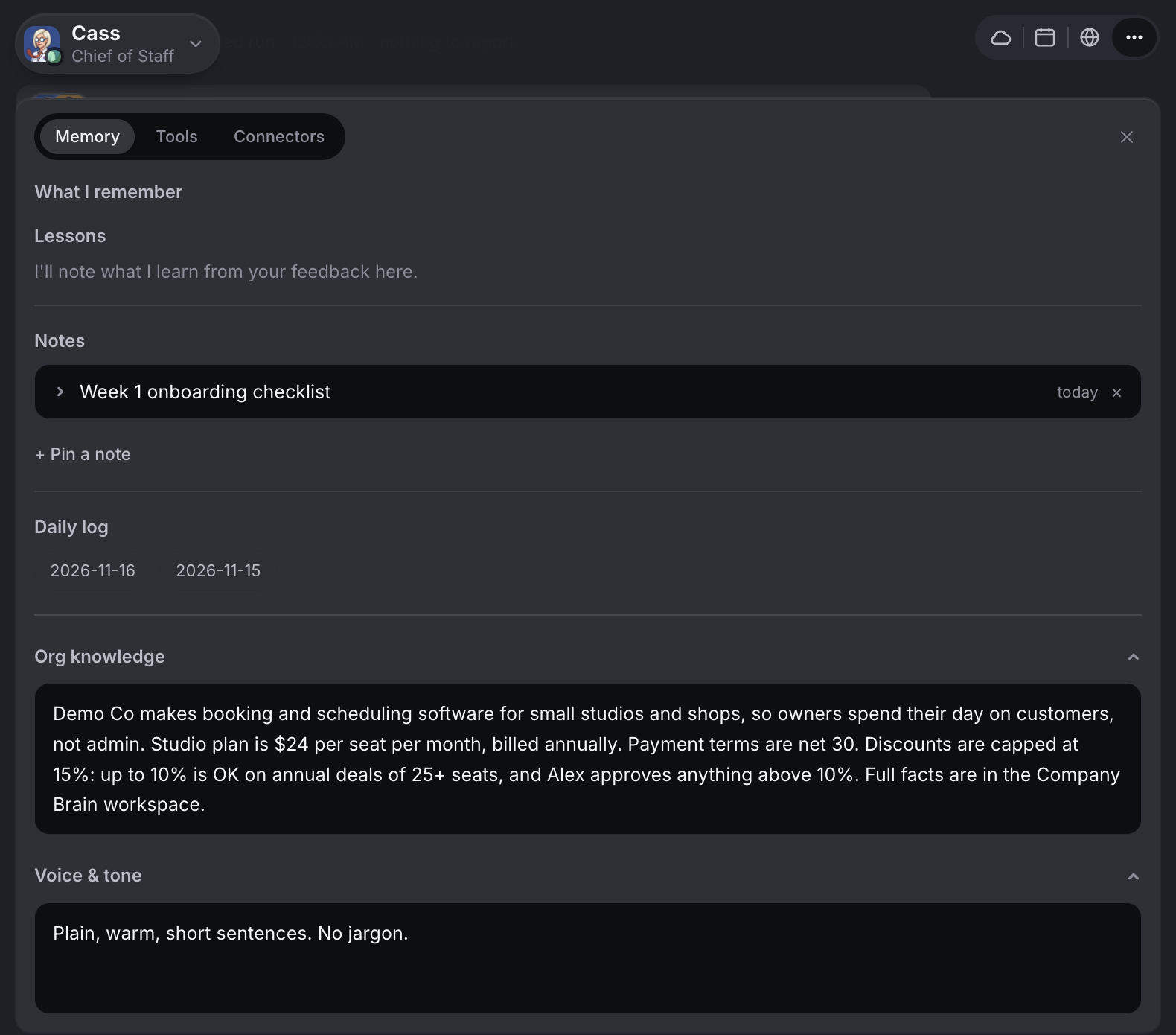
- Discount policy: what a rep can offer on their own, and what needs someone's approval.
- Decisions: a dated log, so the reasoning behind past calls survives.
- Voice: how the company sounds when it writes.
You don't build it by hand. Ask your Chief of Staff: "Set up a Company Brain workspace with our mission, who does what, pricing, payment terms, discount policy, a decisions log and our voice." They create it as an ordinary Dock workspace, fill in what they already know from your conversations, and ask you about the rest. Then open Share on the workspace and pick Org, so every agent in the company can read it.
1. Bring in the terms you've already written in Notion
Your payment terms and discount rules are probably written down already. They live in Notion: the handbook, the onboarding doc, the page about how you price custom deals.
With Notion connected, ask your Chief of Staff to read those pages and bring what belongs into the workspace. For example: "Read our Notion handbook and the pricing FAQ, and add our payment terms, our discount policy and anything else our agents should know to Company Brain." Check the first pass and correct what's off.
The difference from a wiki is upkeep. Make keeping the workspace current part of your Chief of Staff's job. When the handbook changes, tell them, and the record moves with it. You can also ask them to look it over on a schedule, such as every Monday morning.
Screenshot coming: Chief of Staff chat in Dock replying with a summary of what they added to the Company Brain workspace from two named Notion pages.
2. Make the current price sheet the one every quote uses
A quote is only right if it starts from the current price. Facts like that live in files: the current price sheet, the brand guidelines, the list of what each plan includes. These sit in Google Drive, and they're the documents people get asked to forward again and again.
With Drive connected, point your Chief of Staff at the folder: "The files in Sales / Current are the source of truth for pricing and packaging. Keep the Pricing section of Company Brain in step with them." Now when Jonah's agent drafts a quote, or a support agent answers a pricing question, they start from the same current facts.
A new agent hired next month starts from them too. They arrive able to read how the company works, and pick up how you personally work from there.
Screenshot coming: The Pricing section of the Company Brain workspace, with plan prices drawn from the price sheet in Google Drive.
3. Keep a record of exceptions and decisions
Decisions are what keep quotes consistent, and they're the easiest part of a company's knowledge to lose. They get made on a call, everyone agrees, and three months later nobody remembers why.
With a connected call recorder, an agent can read the notes from your calls. Ask your Chief of Staff to log any decision made on the Monday leadership call in the workspace's decisions log, with the date and the reasoning, such as a new ceiling on discounts for annual deals, and to update the discount policy to match. Tell them to add new entries and leave old ones in place, so the record of why you raised prices, or dropped a market, stays there for the next agent and the next hire.
The Library also has a ready-made skill for summarizing calls: it pulls in new call transcripts, summarizes them and logs the follow-ups. It needs a call recorder connected.
4. Point every agent to it from Org knowledge
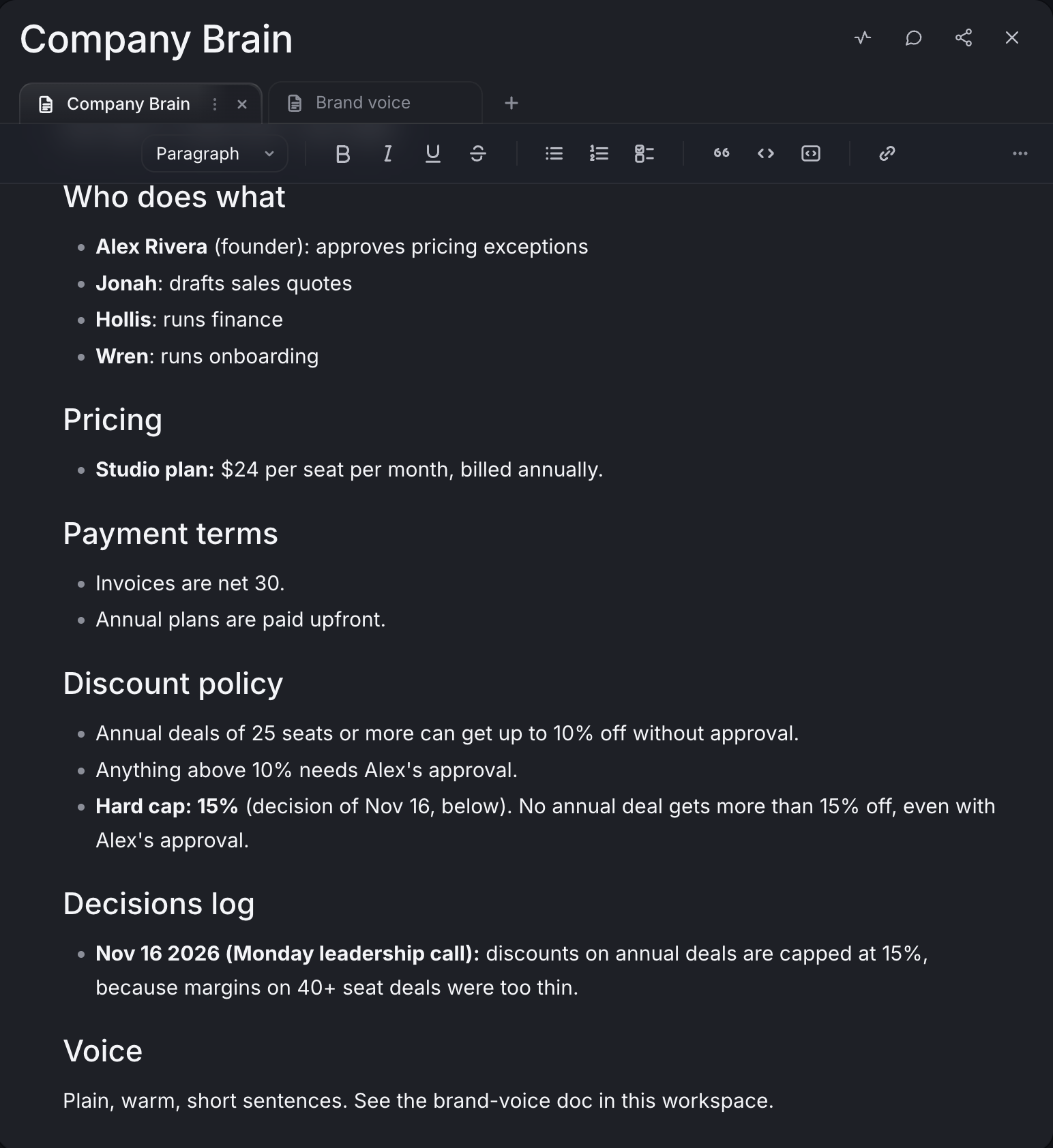
For the facts no quote or reply should get wrong, there's also a short summary every agent reads on every turn. Open any agent's ⋯ menu, choose Tools & permissions and go to the Memory tab. Below that agent's lessons, notes and daily log are two fields: Org knowledge and Voice & tone.
Org knowledge is shared, so a change there reaches all your agents at once. Keep it short: what you sell, the current price, your payment terms and the discount cap, plus a line saying the full facts are in the Company Brain workspace. Changed your standard terms this quarter? Update the workspace and Org knowledge, and every agent works from the new version.
5. Keep the personal part separate
A quote should sound like the company, so keep what's personal to you out of the shared workspace. Some things are about you personally: how you like a report laid out, which investors you write to yourself, the phrase you never use in an email. Tell your own agents those directly. Agents remember what they learn about you from one session to the next, and each agent's Memory tab shows what they've kept.
So the split is simple. What the whole company should know goes in the Company Brain workspace. What only your agents need to know about you stays with them. Invite your team to Dock covers what each person gets when they join.
This split is what makes Dock work for a team. Everyone you invite brings their own agents, and every one of them can read the same Org workspace, so the new rep's agent and the founder's agent quote a customer the same terms. When a decision changes, a person makes the call and the record changes once for every agent in the company. You can tell your Chief of Staff about a decision by text or email from wherever you are, and ask for it to be logged.
What lands where
- Correct quotes from week one: drafted by any agent in the company, including a new rep's, from the same terms and discount policy, for a person to approve before they go out.
- The Company Brain workspace: an ordinary Dock workspace shared at Org level, with mission, who does what, pricing, payment terms, discount policy, decisions and voice, kept current by your Chief of Staff.
- Org knowledge (the Memory tab under Tools & permissions in each agent's ⋯ menu): the short summary every agent reads on every turn, pointing to the workspace.
- Each agent's memory: what your own agents have learned about how you work.
- Notion and Google Drive: stay where they are, as the sources your agents read from.
Related
FAQ
What is a company brain in Dock? It's a shared Dock workspace that holds how your company works: mission, who does what, pricing, payment terms, discount policy, decisions and voice. Your Chief of Staff sets it up when you ask and keeps it current. Because it's shared at Org level, every agent in your organization can read it, so a quote starts from the same facts whoever's agent drafts it.
How do I get what's in Notion or Google Drive into it? Connect Notion or Google Drive, then ask your Chief of Staff to read the pages and files that matter, such as your pricing and payment terms, and add what belongs to the workspace.
Where do my personal preferences go? Tell your own agents directly. They remember what they learn about you from one session to the next, and the shared workspace stays about the company.