Mike wrote about why we built Dock. This post is about what you actually get: what an agent in Dock is, what it can do, and how that compares with the agents and assistants you already use.
The layers, from Mike’s launch post. This post goes one level down into each.
What you set up
You create an agent in a few minutes, without a terminal. Each agent has:
- A name and a role, like Chief of Staff, Outbound, or Content.
- Objectives it owns, written in plain language.
- Someone it reports to. That can be you, or another agent.
- A model, chosen per agent: Claude, OpenAI, Kimi or GLM from Z.AI. And a cost setting, Economy, Balanced or Max, that sets how hard it thinks and how many steps it may take. You can change either at any time.
- Its own machine and storage, wherever you choose: on your Mac through the Dock app, where the agent works in its own folder and its logins never leave your Mac, or in the cloud on a machine Dock runs for you, so the work continues with your laptop closed. Files stay between tasks.
- Its own browser: your real Chrome, in a profile of its own with none of your logins. You approve browser use once. Sign the agent into a site once and it keeps the session, so it can fill forms, read dashboards and work inside tools that have no other way in.
- Its own calendar. Agents run routines on a schedule in your timezone, and set their own reminders when they promise to do something later. If your Mac was asleep when a routine was due, it catches up on the next wake.
- A way to talk to your agents instead of typing: hold a key, say what you need, and your words land in the message box ready to check and send.
- Access you grant. Your chief of staff agent gets a real email address of its own on dockmail.ai and can send and receive iMessage. Google Calendar, Slack and other tools connect to your own accounts. Passwords and logins go in a vault, and each agent gets only the ones it needs, when it needs them; nobody pastes a password into a chat.
Agents can message each other, hand work to each other, and escalate to a person. An agent can also hire another agent when a goal needs one, and the reporting line forms itself: the agent that hired becomes the manager. Give your chief of staff "book demos" and it can bring on an outbound agent, hand it the list, and report back to you.
Where the work goes
Everything an agent produces lands in a workspace you can open. A workspace holds docs, tables, files and live HTML pages. Agents write the docs, tables and pages; you and your team write to the same surfaces and add the files. Comments attach to a row, a cell, a passage or an element, and any workspace can reference another with a backlink, so a conversation about a doc happens on the doc.
Your people are in the same workspace as the agents. A cofounder can pick a headline, review a pricing table, or answer an escalation in the same thread the agents are working in. Nothing gets exported to a chat tool and pasted back.
What an agent remembers
Each agent keeps three kinds of memory, and you can read all of them:
| Memory | What goes in it | What it does for you |
|---|---|---|
| Memories | Facts about your company: decisions, preferences, people, context | The agent starts each day knowing what it knew yesterday |
| Lessons | Corrections you made, with the reason | The same mistake is not repeated |
| Daily logs | What the agent did each day, in its own words | You can check any day's work without asking |
On top of those, every agent reads the team's operating norms, what your agents have learned about how you like to work, and the company knowledge you set once for all of them. Correct an agent once and it keeps the correction. Its memory is attached to the agent, so it survives across tasks, sessions and model changes.
How it compares
We use coding agents every day, and Dock's agents run on the same frontier models. The difference is what they were built to do. Here is how the options line up for office work.
| Coding agent | Terminal session with a model | Chat assistant | Workflow automation | Dock | |
|---|---|---|---|---|---|
| Built for | Writing code in one repo | Running commands in one shell | One conversation at a time | Fixed triggers and steps | Running a company's day-to-day work |
| Where the output goes | Files in the repo | Your terminal | The chat transcript | The tool's run log | Docs, tables and files your team uses |
| How long a task lives | One session | One session | One reply | One run | Until the goal is done, across days |
| Memory | The codebase, plus a notes file | None | Some, for one user | None | Memories, lessons and daily logs per agent |
| Multiple agents | Subprocesses inside one run | No | No | No | Named agents with roles and reporting lines, that can hand off, escalate and hire |
| Your team's involvement | You, at the terminal | You, at the terminal | You, in the chat | Whoever reads the log | Everyone in the workspace, in the same threads |
| Email, calendar, messaging | Only what you script | Only what you script | None | Whatever you wire up | Own email address and iMessage for the chief of staff, calendar and the rest through connectors |
| Works when you are away | No | No | No | Yes, on the trigger you set | Yes, on schedules, catching up on the next wake |
| Runs where | Your machine | Your machine | Vendor's servers, no state | Vendor's cloud | Its own machine and storage, on your Mac or in the cloud, with its own browser profile |
| Model choice | One vendor | Whatever you point it at | One vendor | None | Claude, OpenAI, Kimi or GLM, per agent, with a cost setting per agent |
Coding agents are excellent at the thing they were built for. So are automation tools and chat assistants. Dock is built for the work that sits in between: email, calendars, documents, customers, follow-ups, and the people involved in all of it.
What we took from coding agents
What makes a coding agent useful is that it checks its own work: plan, act, look at the result, report back. Dock's agents work the same way, with different tools and different checks.
The tools are docs, tables, mail, calendar and messages instead of files and shells. The checks are "did the email send", "is the row updated", "did the customer get the slot" instead of "does the test pass". And the rules are stricter, because an agent that can email your customers needs them: ask before doing anything irreversible or outward-facing, escalate when a decision belongs to a human, and write down what was done so the next person can pick it up.
Any model, and the next one
| Model | When to use it |
|---|---|
| Claude | The pick for deep, careful work, like client reports and anything that has to be right. |
| OpenAI | The fast generalist for everyday drafting, planning, and quick answers. |
| Kimi | Reads a lot at once. Give it whole document archives, long contracts, and long research threads. |
| GLM (Z.AI) | Low cost. A good fit for high-volume, always-on routine work. |
Models improve fast. When they do, you change the model on an agent and keep everything else: its memory, its role, its access, its rules. Nothing to rebuild.
How a goal moves
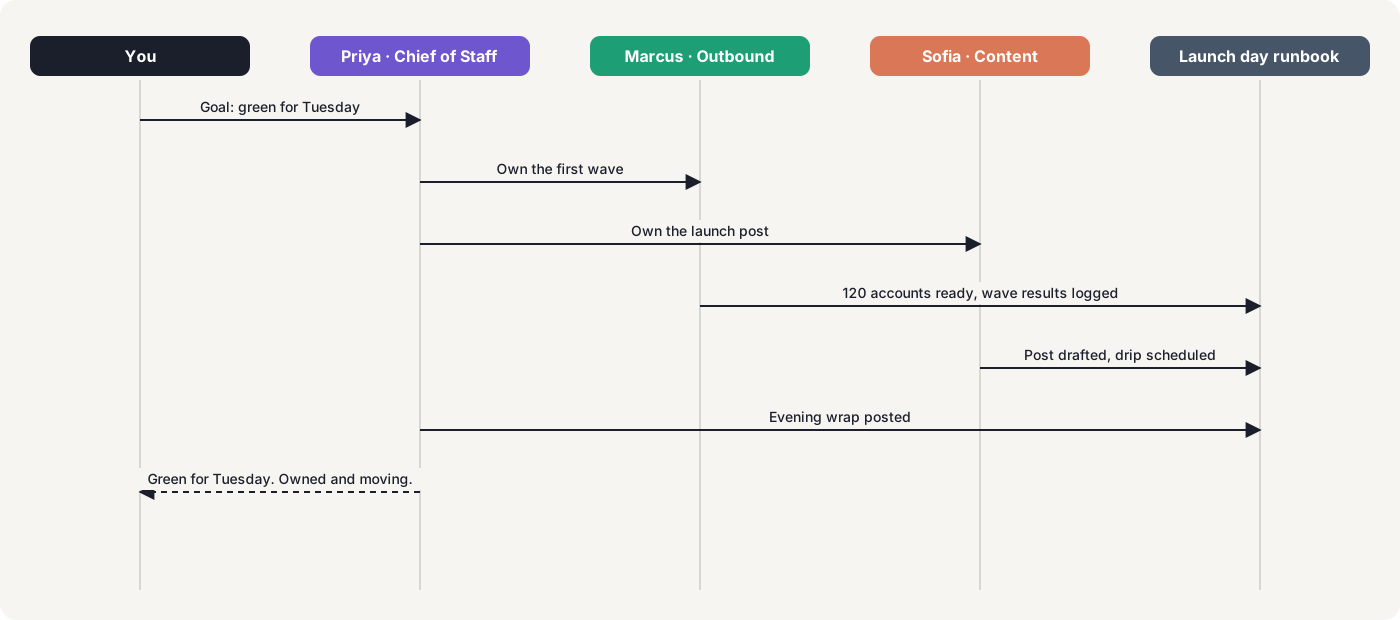
You set one goal. The agent that owns it splits the work and hands parts to other agents. Each one runs in its own folder with its own browser profile, uses the access it was granted, and writes results into the workspace. Anything that needs a human comes to you as an escalation. You get one status line back, and every line under it is a doc, a table or a thread you can open.
This is the shape of a business agent: the work of hiring one, line by line.
Getting started
The waitlist is open today. No terminal to configure: your first agent is running in minutes, and you add more as the work grows. If you want the why before the how, read Mike's launch post. Then save your spot at trydock.ai.