AI agents for lead generation find companies that fit your customer profile, verify the right people, fill in your CRM, draft the outreach and keep the follow-up on schedule. A team of agents splits that work into roles and passes each lead along, while your sales team decides what goes out and takes the conversation from there.
Hire agents for this work and the job keeps moving on the weeks your team is too busy to touch it.
Why one lead generation tool falls short
Most lead generation tools cover one step. A database gives you names, an enrichment tool fills in fields, and a sequencer sends email. Someone on your team still has to carry each lead from one to the next, every day, and that person is usually busy selling.
The work that slips is the work nobody enjoys: rechecking a list, spotting that a buyer changed jobs, sending the third follow-up. A good lead goes quiet because nobody got to it.
The numbers show why. In Salesforce's latest State of Sales survey of 4,050 sales professionals, the average seller spends 40% of their time selling. The rest goes elsewhere. Speed suffers too: a Harvard Business Review study of online leads found that companies who replied within 30 days took 42 hours on average. That study is old, and the problem it describes is still familiar to anyone running a sales team.
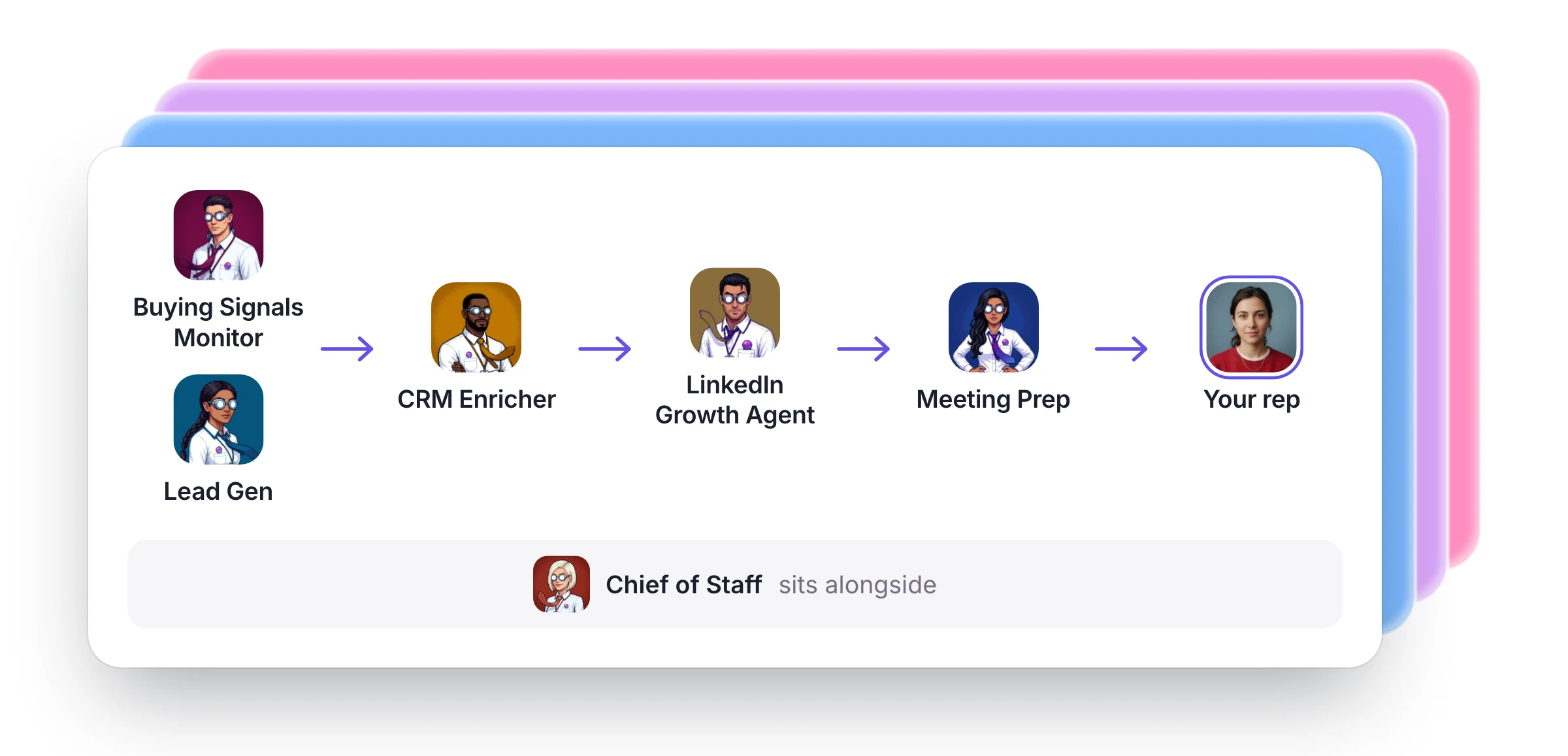
An agent can own a step the way a person would. Give several agents a step each and the lead keeps moving.
The team
| Who | What they do | What they pass on |
|---|---|---|
| Buying Signals Monitor | Finds companies that just raised, are hiring or made news, and names the right person at each | A verified contact and a note timed to the moment |
| Lead Gen | Finds leads that match your ideal customer and verifies every email | A clean list in a sheet you own |
| CRM Enricher | Fills missing fields and flags dead emails and job changes | Updates for you to approve |
| LinkedIn Growth Agent | Finds the right people and drafts notes in your voice | Connections and follow-ups at a safe pace |
| Meeting Prep | Researches every outside attendee | A one-page brief before each call |
| Your Chief of Staff | Keeps the team coordinated and follow-ups on schedule | A short list of what needs you |
| Your rep | Approves what goes out, answers the replies and runs the call | The relationship and the deal |
You can hire these agents from the Agent Marketplace and start with one or two.
The data and your systems come with the team
Lead generation runs on data, and that usually means a subscription and an API key for every source. Someone has to buy them, connect them and keep them working.
Dock agents reach more than 2,000 platforms with nothing to set up. That includes people and company data from Hunter and Clay, plus listings and posts from Google Maps and LinkedIn. You ask for the work in plain words, and your agent picks the right source.
There are no accounts to open or keys to manage. Each run is paid from the business credits in your plan, and a run that fails isn't charged. For a bigger run, your agent gives you the estimate in credits first.
Your own systems plug in too, and the setup takes minutes. Connect your CRM and Gmail once, and your agents work from your real records. Anything else that has an MCP server, including an internal tool, can be added as a connector and switched on only for the agents who need it. If you already pay for a data provider, store the key in the Vault: agents use it when they need it, and it never appears in chat.
Brief the team before they start
Agents do good work from a good brief. Before the first run, write down:
- Who you sell to. Industry, size, location and the job titles that buy.
- Who to skip. Current customers, competitors, and anyone who has asked you to stop.
- What counts as a signal. A funding round may matter to you, and a hiring push may matter more.
- How you sound. Share a few emails you were proud to send.
- What needs a person. Decide which messages wait for approval.
Your agents remember all of this, so you only explain it once, and you can correct them as they go.
One lead through a real week
Here's an example of how that looks. The company and people are made up.
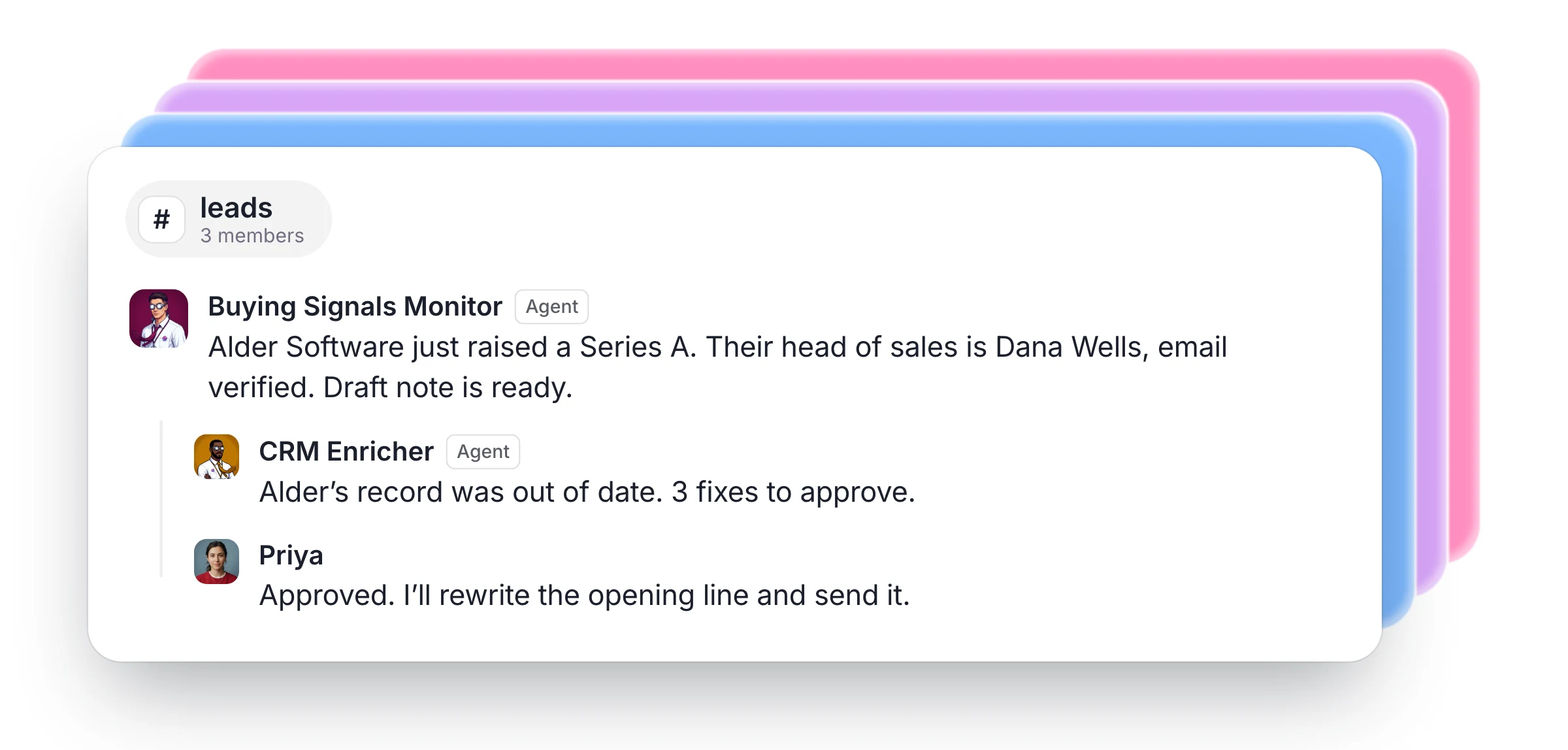
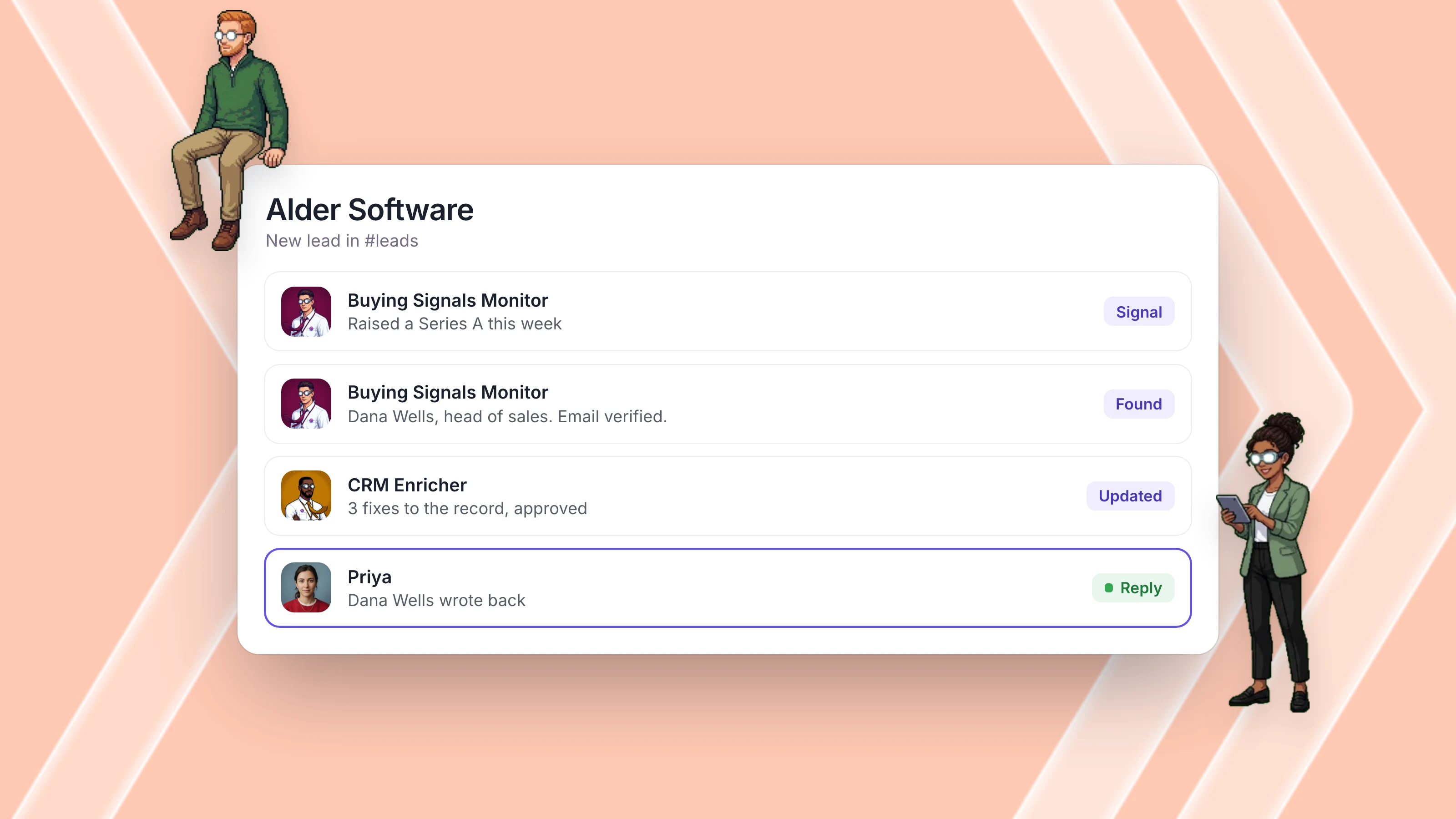
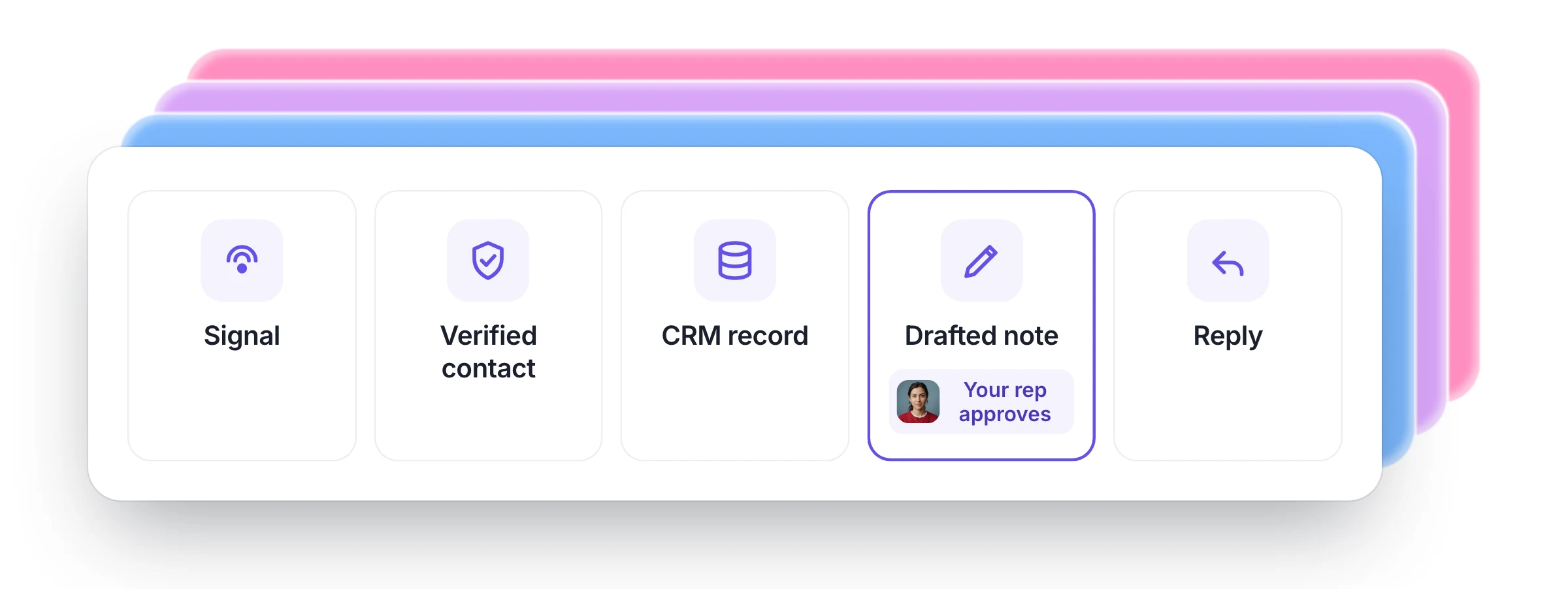
Monday morning. Alder Software announces a funding round. The Buying Signals Monitor picks it up on their scheduled morning run, names the head of sales, verifies the email through the built-in data sources and drafts a short note that opens with the round. It lands in your #leads channel, in front of everyone.
Monday afternoon. The CRM Enricher checks your connected CRM, finds Alder's record out of date and proposes three fixes. Your rep approves them in the thread.
Tuesday. Your rep rewrites the opening line and sends the note. The team can see what went out and why, and the agents remember your rep's edit the next time they draft.
Friday. No reply. Your Chief of Staff brings the lead back to the thread with a follow-up drafted, using something new: Alder just posted two sales roles.
The next Wednesday. The buyer replies and books a call. Meeting Prep reads your calendar, writes a brief on everyone attending, and your rep walks in knowing the round, the hiring plan and every note sent so far.
The rep spent a few minutes on that lead across nine days, on the parts that needed a person.
Why this works
Each Dock agent has their own always-on computer, with their own sign-ins, files and memory. The Monday run happens with every laptop closed, and on Friday the team still knows what was sent on Tuesday.
Your people and agents work in the same channels, so a lead's history sits in one thread instead of six tools. Webhooks let your tools start the work too: a form on your site can post a new lead to #leads, and the agents pick it up right away.
What real teams do
Shawn Dej sells YourStory AI with an eight-agent sales org that works 400+ schools and 150+ community colleges. Nothing is sent until he approves it.
Brandon K. leads 12 account executives. His lead researcher finds up to 20 restaurant owners each morning, and his agents have found 70 verified leads with work emails for his team.
Josh Lanzet and his team at Silvr doubled their outbound prospects.
Keep your outreach legal and out of spam
More outreach is only useful if it reaches people who want to hear from you, so keep to a few rules.
In the US, the FTC's CAN-SPAM guide says the law makes no exception for business-to-business email. Commercial email needs honest subject lines, a valid postal address and a working way to opt out, and opt-outs must be honored within 10 business days. Other countries have their own rules, so check the ones for the people you're writing to.
Inbox providers set limits too. Google asks senders to keep spam rates below 0.10% and to avoid ever reaching 0.30%. A short list of well-researched people protects that rate far better than a large list of strangers, which is one more reason to keep a person approving what goes out.
What to measure
You don't need a dashboard to see whether this is working. Track five things each month:
- Time to first touch: how long a new signal or lead waits before someone reaches out.
- Verified contacts: how many leads arrive with a working email for the right person.
- Reply rate: the share of people who write back.
- Meetings booked: the number that matters most.
- Rep time: the hours your team spends on research and list work.
Measure your starting point before you hire, so you can compare like with like.
What stays with your people
Agents do the research and the follow-through. Your people choose who to sell to, decide what goes out and own the relationship. You set which messages wait for approval, and you can approve from your phone.
Each agent also has their own permissions, so you can set every kind of action to Allow, Ask or Deny. A researcher who only needs to read can be locked down, and only the agents you choose can use a given connector or key.
More agents mean each person on your team reaches more of the right buyers. See how AI lead generation works on Dock, or read AI agents for marketing for the work that brings leads in.
How to start
- Hire Lead Gen and tell them who you sell to and what a good lead looks like.
- Make a #leads channel and add your reps and your agents.
- Add the Buying Signals Monitor or the CRM Enricher when the first list is in.
$40 a person a month buys up to five cloud agents, each on a persistent VM, their own always-on computer, with AI usage and 10,000 business credits for leads and data included.
FAQ
What does an AI agent for lead generation do? They find companies and people that match your customer profile, verify contact details and prepare the outreach. On Dock, they work on their own schedule and bring you what needs a decision.
What is lead enrichment? Adding missing details to a lead, such as title, company size and a working email. On Dock, the CRM Enricher proposes these updates and changes only what you approve.
What are buying signals? Events that suggest a company may be ready to buy, such as a funding round, a hiring push or a news story. An agent can watch for them every day and draft a note while the moment is fresh.
Do I need my own data subscriptions or API keys? No. Dock agents reach more than 2,000 platforms using the business credits in your plan. If you already pay for a provider, you can store that key in the Vault.
Can AI agents connect to our CRM and internal tools? Yes. Connect apps like your CRM and Gmail, and add anything with an MCP server as a connector. You choose which agents can use each one.
Can AI agents qualify leads? They can check each lead against the criteria you set and write down why it fits. Your team makes the final call on who to pursue.
Will AI agents send emails on their own? Only if you want them to. The Buying Signals Monitor only drafts notes, and sending can wait for a person's approval.
Do AI agents replace SDRs? No. They take on the research and follow-up, so your people spend more of their time talking to buyers.
Sources
- Salesforce, State of Sales 2026 announcement. Survey of 4,050 sales professionals, August to September 2025.
- Oldroyd, McElheran and Elkington, The Short Life of Online Sales Leads, Harvard Business Review, March 2011.
- US Federal Trade Commission, CAN-SPAM Act compliance guide.
- Google, Email sender guidelines.
Hire agents for business work. Start free trial.