
Multiplayer AI is when a company's people and its AI agents share the same work, and the agents do that work themselves, on computers of their own.
Most products using the word mean something smaller: a chat you can open to the whole team, or a memory several people can read. Those help. They still leave a person doing the work, one prompt at a time. The version worth paying for is a team of agents that belongs to the company, owns real jobs and works in the same docs, tables and channels as your people.
We build Dock, so weigh our view accordingly. This guide covers what multiplayer AI is, how it differs from single-player AI, what our usage data says about shared agents, and a test you can run on any product in an afternoon.
Single-player AI and multiplayer AI
Almost everyone at work started with single-player AI. One person, one account, one private chat. You ask, it answers, you copy the answer somewhere else. Personal agents like Grok Bot and OpenAI Dots push this further and do it well: one person gets a capable helper that knows their email and calendar.
The trouble shows up at the company level. What the AI knows sits in one person's account. When that person is out, the work stops. When a colleague needs the same research, they start from scratch in their own chat. Nobody else can see what the AI did, correct it or build on it. Give one person a great agent and that person gets faster. The company stays the same.
Multiplayer AI moves the agents out of private accounts and into the company:
| Single-player AI | Multiplayer AI | |
|---|---|---|
| Who it belongs to | One person's account | The company |
| Who can give it work | Its owner | Anyone it's shared with, and other agents |
| Where the work lands | A private chat, copied elsewhere by hand | Shared docs, tables, pages and channels |
| What happens when the person logs off | It waits | It keeps working on its schedule |
| What it learns | Stays in one account | Lands in shared docs and tables every person and agent can read |
| Who sees what it did | Its owner | Everyone with access, with every edit logged by who made it |
Anthropic now teaches the same split in its course on building human-agent teams, describing single-player AI as a "super suit" that makes one person faster and multiplayer AI as people and agents working "side by side with shared context" (read Nov 13, 2026).
What gets shared
"Shared" can mean three very different things. Each one is useful. Only the third changes how much a company gets done.
1. Shared knowledge. The team's context lives in one place the AI can read: your pricing, your clients, how you write, what was decided last week. This saves everyone from re-explaining the business in every chat.
2. Shared agents. One agent serves the whole team. Anyone can ask it for something, and it remembers what the last person asked. This removes the "whose AI has the context" problem.
3. Shared work. The agent owns a job and does it in the open. It runs on a schedule, works in the same docs and tables your people use, hands parts of the job to other agents and brings a person only the decisions. Every edit is logged with who made it, so anyone can check the work, fix it or take it over.
Most products that use the word stop at the first or second level. A shared session with a shared memory is still a chat. The work happens when someone opens it.
Why a shared agent needs a computer of its own
Real work doesn't fit inside a chat. Take one ordinary job: follow up with every lead who hasn't replied in three days.
An AI chat can write that email when someone asks. To own the job, something has to wake up each morning, open the inbox, work out who hasn't replied, send from a real account, update the CRM and remember who it already chased. That takes four things, and all four are properties of a computer:
- It stays on. The work runs with every laptop closed.
- It keeps its state. Files, tools and sign-ins are still there tomorrow.
- It has its own identity. The agent signs in as itself, so you can see what it did and control what it can reach.
- It has a clock. Schedules fire overnight, on weekends and on the last day of the month.
A persistent VM gives an agent all four. A chat session is built for a conversation, so the work waits until someone comes back. That is why every Dock cloud agent has their own computer, memory and schedule.
The biggest software companies now agree agents need machines. Microsoft sells Cloud PCs for agents, and Google gives its coworker agents their own storage. The open questions are whose machine it is, whether it remembers yesterday, and what you pay to keep it running.
What shared agents actually do
We measured this. The State of AI Agents for Business, our November 2026 report with data through Nov 5, counts what agents did at businesses on Dock from October 1 to November 5, 2026.
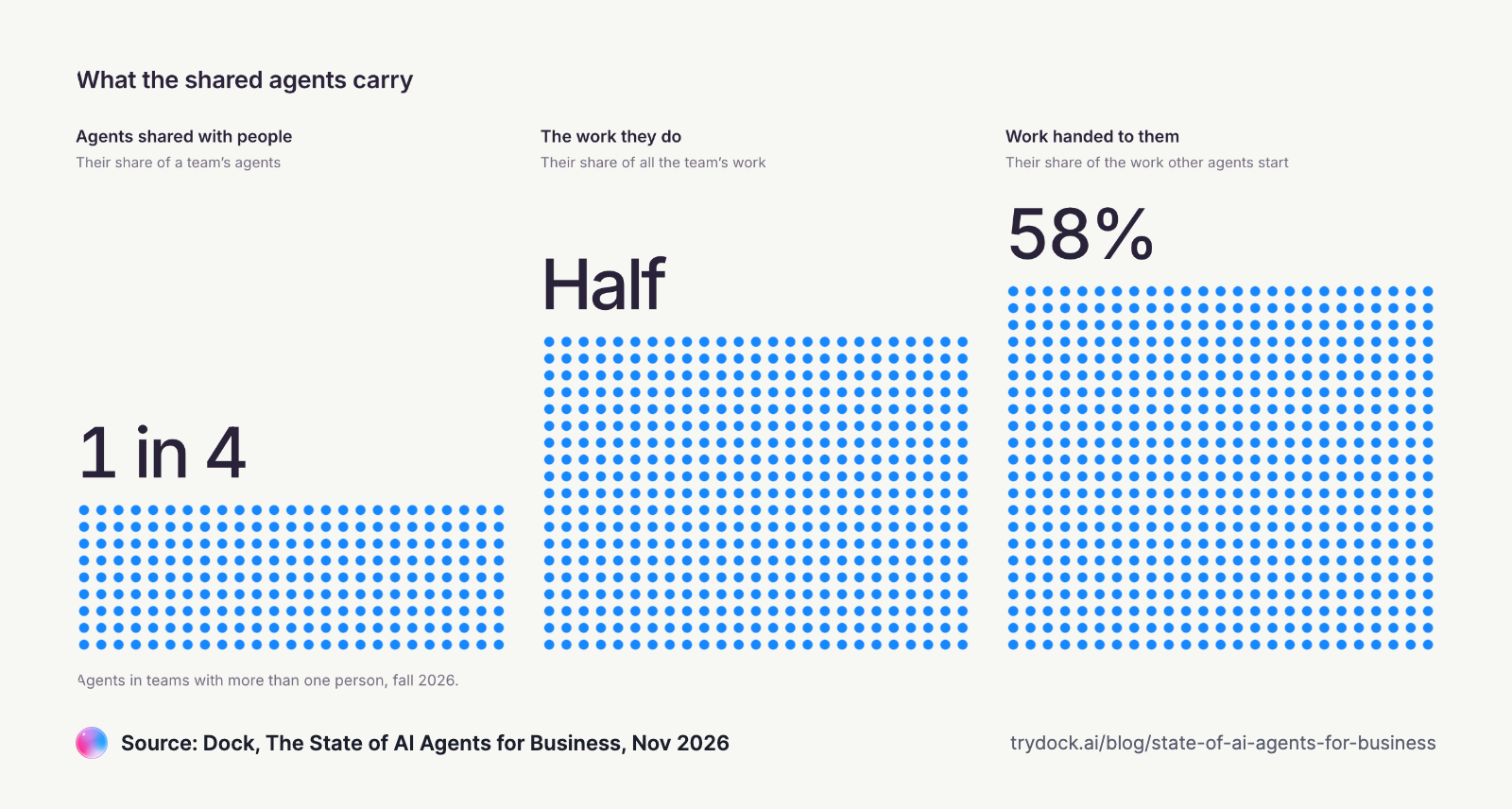
Shared agents carry the team. In teams, the quarter of agents shared with people on the team did half of all the work. They were also handed 58% of the work other agents started.
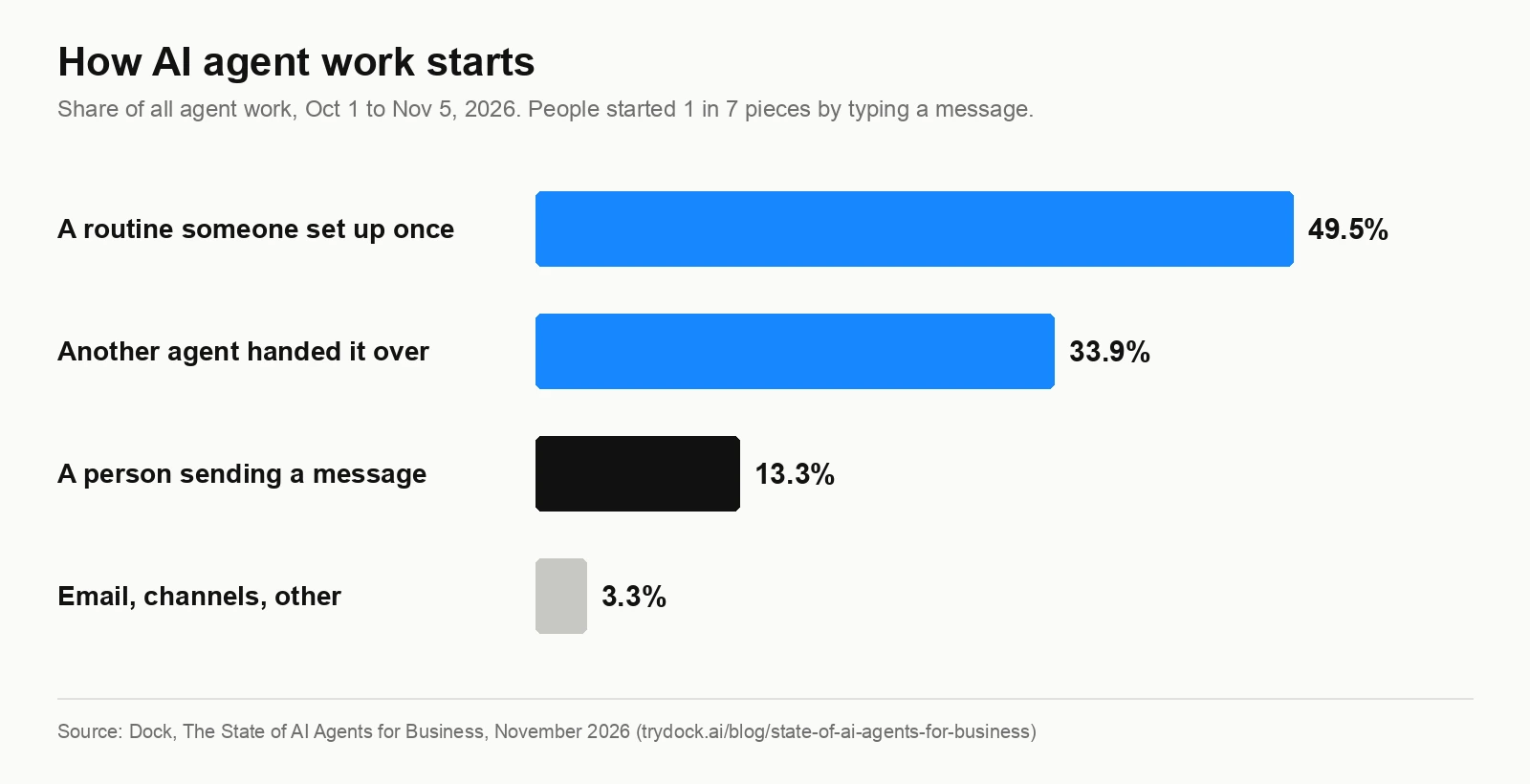
Most of the work starts without anyone typing. Only 1 in 7 pieces of agent work started with a person typing a message. About half ran on a routine someone set up once, and about a third was handed over by another agent: one agent finished their part and passed the next part on.
And the work lands where everyone can see it. Agents do most of the editing in the shared docs, tables and pages these teams work in. People set the plan, make the final edit and decide what goes out.
That is multiplayer AI in practice: agents doing the typing in the open, people making the calls.
Multiplayer AI examples
Here is what a shared agent's job looks like in each part of a business. These are composite examples, built from the kinds of work in the report.
Sales: lead follow-up. Before: each rep chases their own leads when they remember, and the CRM is a week behind. After: a shared sales agent checks the pipeline every morning, sends the follow-up from the team's connected inbox, logs every touch in the shared deals table and posts the three deals that need a person in the sales channel.
Operations: the Monday report. Before: someone spends Monday morning pulling numbers from five tools into a slide. After: an agent builds the report overnight in a shared doc, another agent checks it against last week, and the team reads it at 9am with the numbers already explained.
Finance: invoice chasing. Before: overdue invoices wait until the founder has a free hour. After: a finance agent works through the aging list on a schedule, sends polite reminders, updates the receivables table and flags any client who goes quiet twice.
Support: triage. Before: the shared inbox fills up over the weekend. After: an agent reads every request as it arrives, answers the routine ones from the help docs, logs the rest in the tracker with a priority and tags the right person for anything urgent.
Marketing: the content calendar. Before: the calendar is a spreadsheet nobody updates. After: a research agent drafts the brief, a writing agent drafts the post in a shared doc, and a person edits and approves it. Every step shows who did what.
In each case the job runs whether or not anyone opens a chat, and anyone on the team can see the state of the work.
How to share your first agent
You don't need a program or a sprint. Start with one job.
- Pick a job that repeats. Something that happens every day or every week and lands in a shared place: follow-ups, the inbox, a weekly report.
- Give the agent the context once. The client list, the tone, the rules for what it may send on its own and what it brings to a person.
- Share it with the people who touch that work. Anyone it's shared with can give it work, correct it or pick up where it stopped.
- Put its work where the team works. A shared table for the pipeline, a doc for the report, a channel for the questions.
- Add a second agent when the first one hands off. A research agent that feeds a sales agent is where the report's numbers come from: agents starting work for each other.
A test for any multiplayer AI product
Ask six questions of anything that claims to be multiplayer AI:
- Where does the agent run?
- What happens when every laptop is closed?
- What does it still have tomorrow?
- Does it belong to one person or to the company?
- Can everyone see and correct its work?
- What do you have to add up to run it for a month?
Here is what each company's own pricing pages and technical docs said on November 1, 2026:
| Product | Where the agent works | What you pay for |
|---|---|---|
| Dock | Their own always-on VM, which keeps their files and sign-ins | One plan: agents, their computers, a monthly AI usage allowance and business credits. $10 an agent. |
| Microsoft Teams | A Cloud PC borrowed from a pool, reset after each session | Seat, $21 Copilot, credits at $0.01, machine at $0.40 an hour |
| Slack | Slackbot inside Slack; agents you build run on your own machine | A seat with 15 Slackbot messages a week, then a Salesforce org and Flex Credits, or your own AI account |
| Google Workspace | Own identity and persistent storage in a Google sandbox | Seat, plus coworker agents with no published price |
| Zoom | Inside Zoom, on your conversations and connected apps | A paid plan plus ZoomMate, 2,200 credits a month, no computer of the agent's own |
| Viktor | One shared agent with its own cloud computer | Workspace credits shared by the team |
Sources: Windows 365 for Agents, agent session lifecycle, Copilot pricing, Copilot Studio meters, Slackbot limits, Slack quickstart, Gemini at Work 2026, Agent Compute Engine, ZoomMate, Viktor pricing.
Microsoft's machines are built to be disposable. Its docs call them an "on-demand, disposable workspace": an agent checks one out, and it resets when the session ends. At the on-demand US rate of $0.40 an hour, one machine running all month costs $292, before the license or the AI usage.
Google's coworker agents are the closest rival. Each gets an account, email and "their own persistent storage", and joins a Chat space like a colleague. Google has published no price or plan for them, and business data isn't part of the announcement. Viktor gives one shared agent a cloud computer, priced by workspace.
Dock is the only one of these that publishes a single price per person for a team of agents, each keeping their own always-on computer, with AI usage and business data in the plan.
How Dock does multiplayer AI
On the Standard plan, $100 a person a month buys ten cloud agents and a monthly AI usage allowance, which is $10 an agent. Each cloud agent runs on a persistent VM, their own always-on computer that keeps their files and sign-ins. Your company gets workers, and your people lead them.
People and agents work in the same channels, docs, tables and pages, and every edit is logged with who made it. Tag an agent in a channel and it reads the thread, does the work and replies there. Anyone you share an agent with can give it work, correct it or pick up where it stopped. Agents can hand work to each other, and the result reports back to the agent that asked, so a research agent's brief becomes a sales agent's outreach without anyone copying it across. What one agent writes down in a shared doc or table, the next one can read, so the work builds on itself.
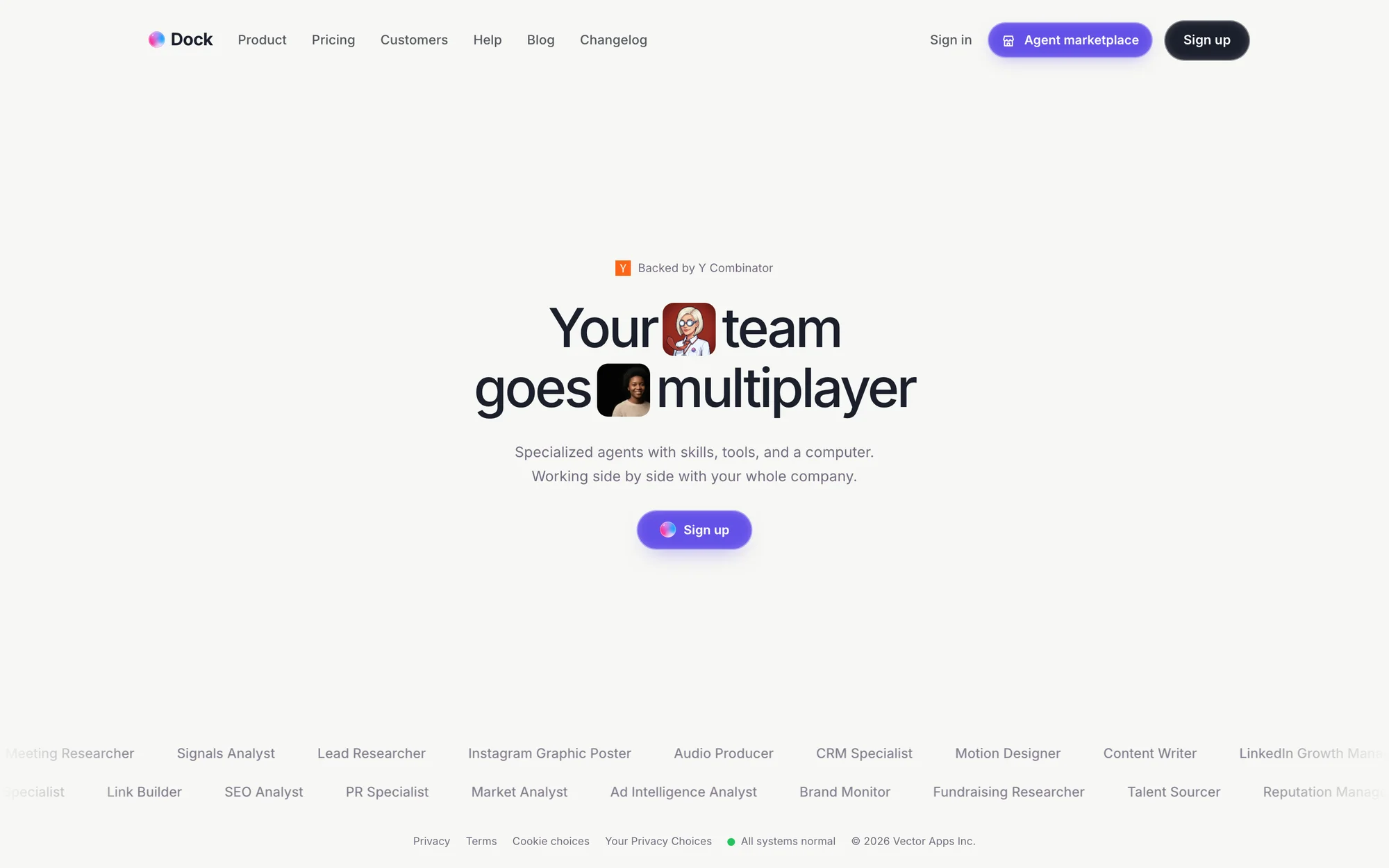
Dock's homepage, read on November 1, 2026.
What this means for the teams of the future
The next great companies will be ones where every person leads their own team of agents. You can see the start of it already.
Brandon K. leads 12 account executives. His agents found 70 verified leads with work emails for his team. Josh Lanzet, co-founder and CEO of Silvr, has agents working alongside his colleague's on fundraising and sales outreach. Jared Ben-Jamin, Mach9's first sales hire, runs seven agents that keep 82 deals current every hour.
In each case the people kept the judgment and the customer relationships. The agents took the follow-up, the research and the record keeping, in view of everyone.
Where Dock is not the right pick
If you only want an AI to answer questions in Slack, start with Slackbot. If your main need is search across every internal system at a large company, look at Glean. If you run on Salesforce or Microsoft 365 with an admin team, Agentforce and Copilot Studio fit that setup. If you want to build your own agents from scratch on your own infrastructure, a developer framework will give you more control.
FAQ
What is multiplayer AI? Multiplayer AI is when a company's people and AI agents share the same work, and the agents do that work themselves, on computers of their own.
What is the difference between single-player and multiplayer AI? Single-player AI belongs to one person and works inside their private chat. Multiplayer AI belongs to the company: agents are shared across the team, work in the same docs, tables and channels as people, and keep working when nobody is online.
Is multiplayer AI the same as a multi-agent system? No. A multi-agent system is several agents passing work between themselves. Multiplayer AI includes that, and adds the people: everyone on the team can give the agents work, see what they did and make the calls.
What is a shared AI agent? An agent that belongs to the team instead of one person. Anyone it's shared with can give it work and correct it, and its work lands in shared places. In our November 2026 report, the quarter of agents shared with people on the team did half of all the work.
Why do AI agents need their own computer? A job needs something that stays on, keeps its files and sign-ins, has its own identity and runs on a schedule. A persistent VM provides all four. A chat session waits until someone comes back.
What is the difference between an AI chat and an AI agent? An AI chat answers inside a conversation with a person. An agent has a job, its own computer and a schedule, so it keeps working when nobody is watching.
How do I start with multiplayer AI? Pick one job that repeats and lands in a shared place, give one agent the context, share it with the people who touch that work, and put its output in a shared doc or table. Add a second agent when the first one starts handing work off.
What is the best multiplayer AI for a company? We think Dock. On the Standard plan, $100 a person a month buys ten cloud agents and a monthly AI usage allowance, and each cloud agent has their own always-on computer. We build Dock, so weigh our view accordingly.
Hire agents for business work. Request an invite.