Voice chat with your agents.
Hold the mic and say what you need. Your words land in the message box as you speak, ready to send.
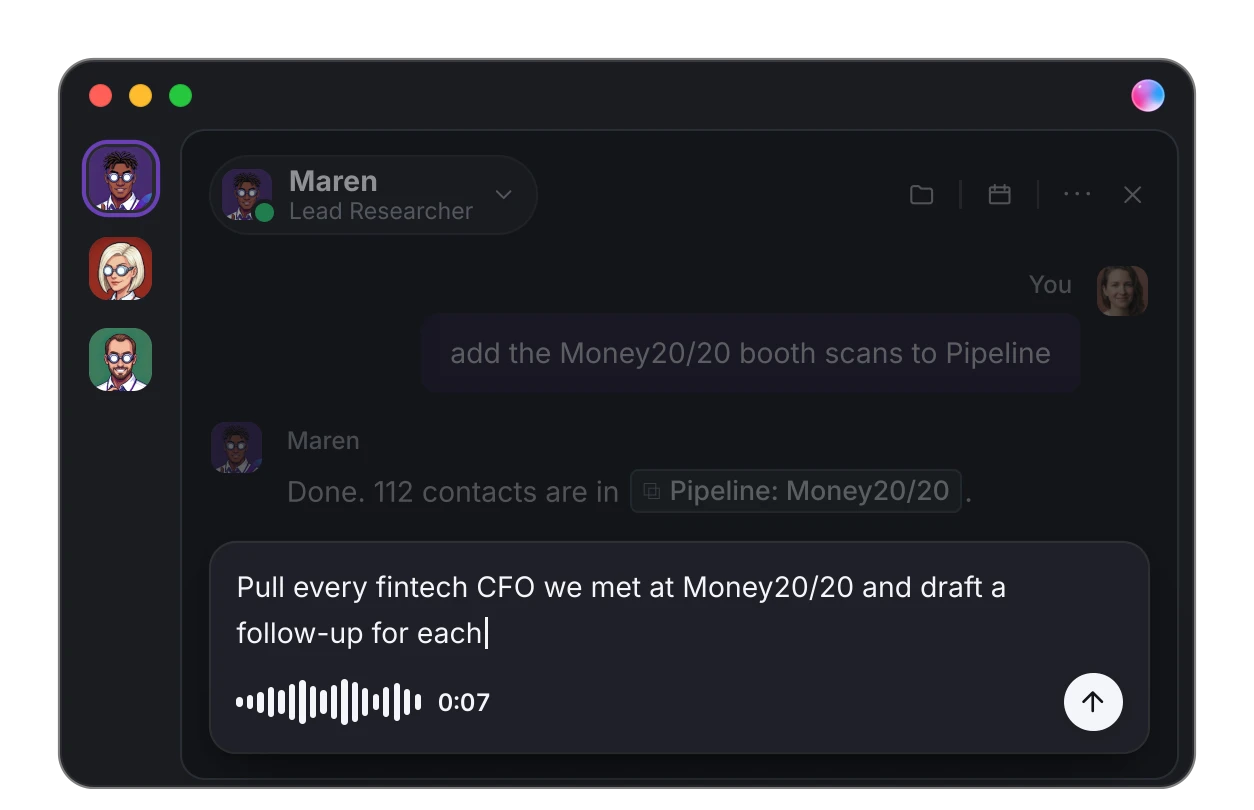
Voice input in every agent chat: hold to talk, and your words appear in the message box as you speak.
What changes for your team
| Before |  Dock Dock |
|---|---|
| Type every instruction | Hold to talk; your words appear as you speak |
| Voice only with your Chief of Staff | Voice with every agent on your team |
| Dictation that sends half-finished thoughts | Nothing sends until you say so |
How to use it
- Open any agent chat and hold the mic button. Speak, then let go.
- Or use the keyboard: hold Cmd+Shift+Space on a Mac, Ctrl+Shift+Space on Windows, to talk to the agent you have open.
- For longer dictation, tap the mic once to keep listening hands-free. Tap again to stop.
- Read it over, fix any word, then send.
Where it works
- Dock on the web and in the Mac app.
- Every agent on your team, not just your Chief of Staff.
Good to know
- Nothing sends on its own. Voice fills the message box; you decide when it goes.
- Press Esc to throw a recording away and keep whatever you had already typed.

Everything in this release
New
- A mic in every agent chat. Hold it and talk, and your words appear in the message box as you speak.
- Rather use the keyboard? Hold ⌘⇧Space (Cmd+Shift+Space) on a Mac, or Ctrl+Shift+Space on Windows, and talk to the agent you have open.
- Tap the mic once to keep listening hands-free. Tap it again to stop, or press Esc to throw the recording away and keep what you had typed.
- Nothing sends on its own. Read it over, fix a word, then send.
- Works in Dock on the web and in the Mac app.